Visual Paradigm Desktop |
  Visual Paradigm Online


A constraint is an expression that constrains the semantics of a UML element. It must always be true—in other words, it is a restriction on an element that limits its usage. Constraints are essential for ensuring that your models accurately reflect business rules, system requirements, and design intentions.
Constraints can be:
Predefined in UML (such as association XOR constraints)
User-defined using formal expressions (OCL), semiformal notation, or human-language formulations
💡 Key Insight: A constraint is one of UML’s three extensibility mechanisms—alongside Stereotypes and Tagged Values—allowing you to add new rules or modify existing ones to extend the semantics of UML building blocks.
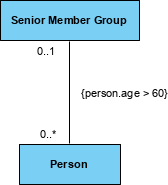
A constraint is rendered as a string enclosed by curly braces {} and placed near the associated element.
A constraint is a Boolean expression that restricts the extension of an associated element beyond what is imposed by other language constructs. For a model to be well-formed, all constraints must evaluate to true.
{ constraint-expression }
Enclosed in curly braces {}
Placed near the element it constrains
Can adorn basic notation to visualize specifications without graphical cues
| Use Case | Example Constraint | When to Use |
|---|---|---|
| Association properties | {ordered}, {unique}, {readOnly} |
Defining collection behavior |
| Multiplicity rules | {must have at least one manager} |
Enforcing cardinality beyond standard notation |
| Business rules | {salary > minimumWage} |
Encoding domain-specific policies |
| Temporal constraints | {startDate < endDate} |
Validating time-based logic |
| State dependencies | {status = 'Active' implies assignedTo ≠ null} |
Linking object state to attribute values |
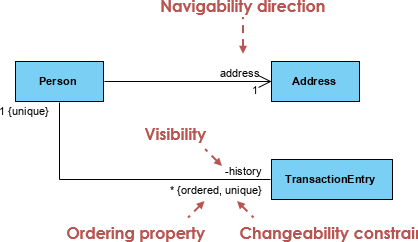
Properties like order and changeability in associations are rendered using constraint notation.
Constraints specify conditions that must hold true for your model to be valid. While you can write constraints as free-form text, for precise semantics, use UML’s Object Constraint Language (OCL).
![How to Model Constraints in UML? [With Examples]](https://www.archimetric.com/wp-content/uploads/2026/04/uml-constraint-example.png)
| Approach | Pros | Cons | Best For |
|---|---|---|---|
| OCL (Formal) | Precise, machine-checkable, unambiguous | Steeper learning curve, verbose | Critical business rules, code generation, automated validation |
| Natural Language | Easy to write, accessible to stakeholders | Ambiguous, not machine-processable | Early design, stakeholder communication, brainstorming |
| Semiformal | Balance of precision and readability | May still require interpretation | Team documentation, iterative design, agile workflows |
Example OCL Constraint:
context Order
inv: self.items->size() > 0
Ensures every Order has at least one item.
More OCL Examples:
// Constraint: Employee age must be at least 18
context Employee
inv: self.age >= 18

// Constraint: Order total equals sum of item prices
context Order
inv: self.total = self.items->collect(i | i.price * i.quantity)->sum()

// Constraint: Manager cannot be subordinate to themselves
context Person
inv: self.manager <> self
Writing formal expressions like OCL can be complex. Modern AI-powered tools simplify identifying, formulating, and applying business rules to your UML diagrams.
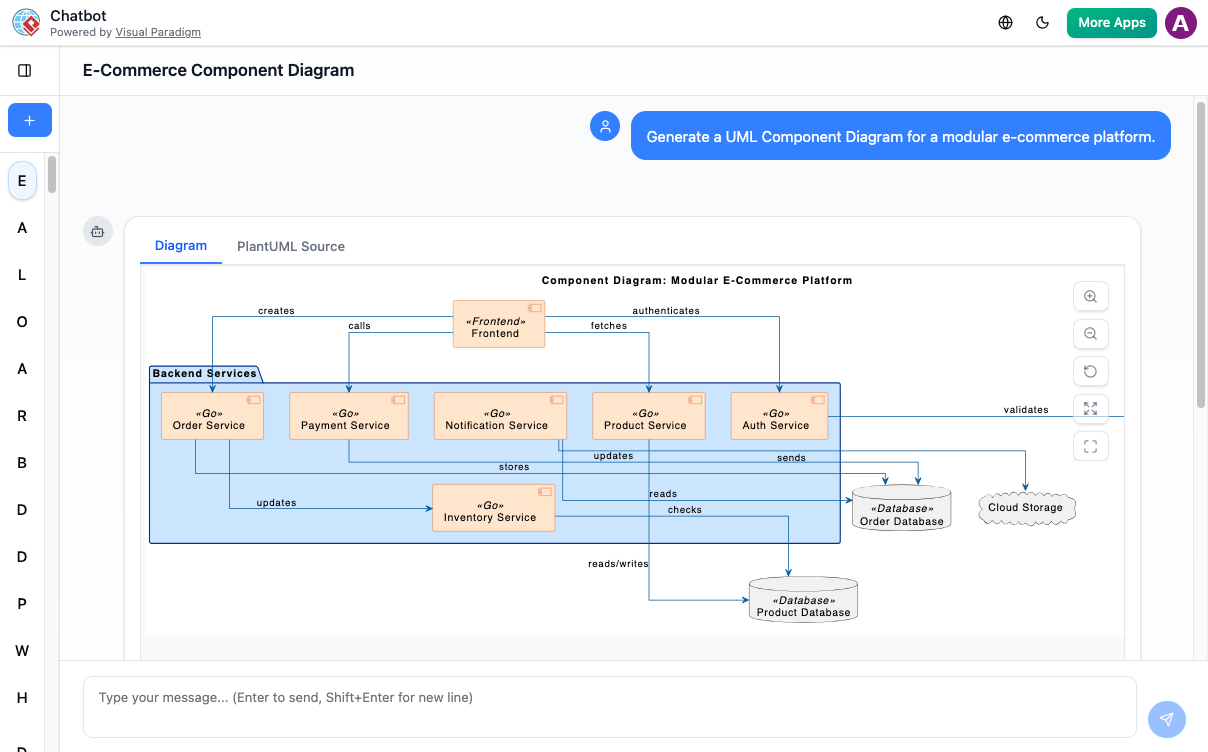
https://chat.visual-paradigm.com/
Describe business rules in plain English and let AI suggest appropriate UML diagrams and constraints.
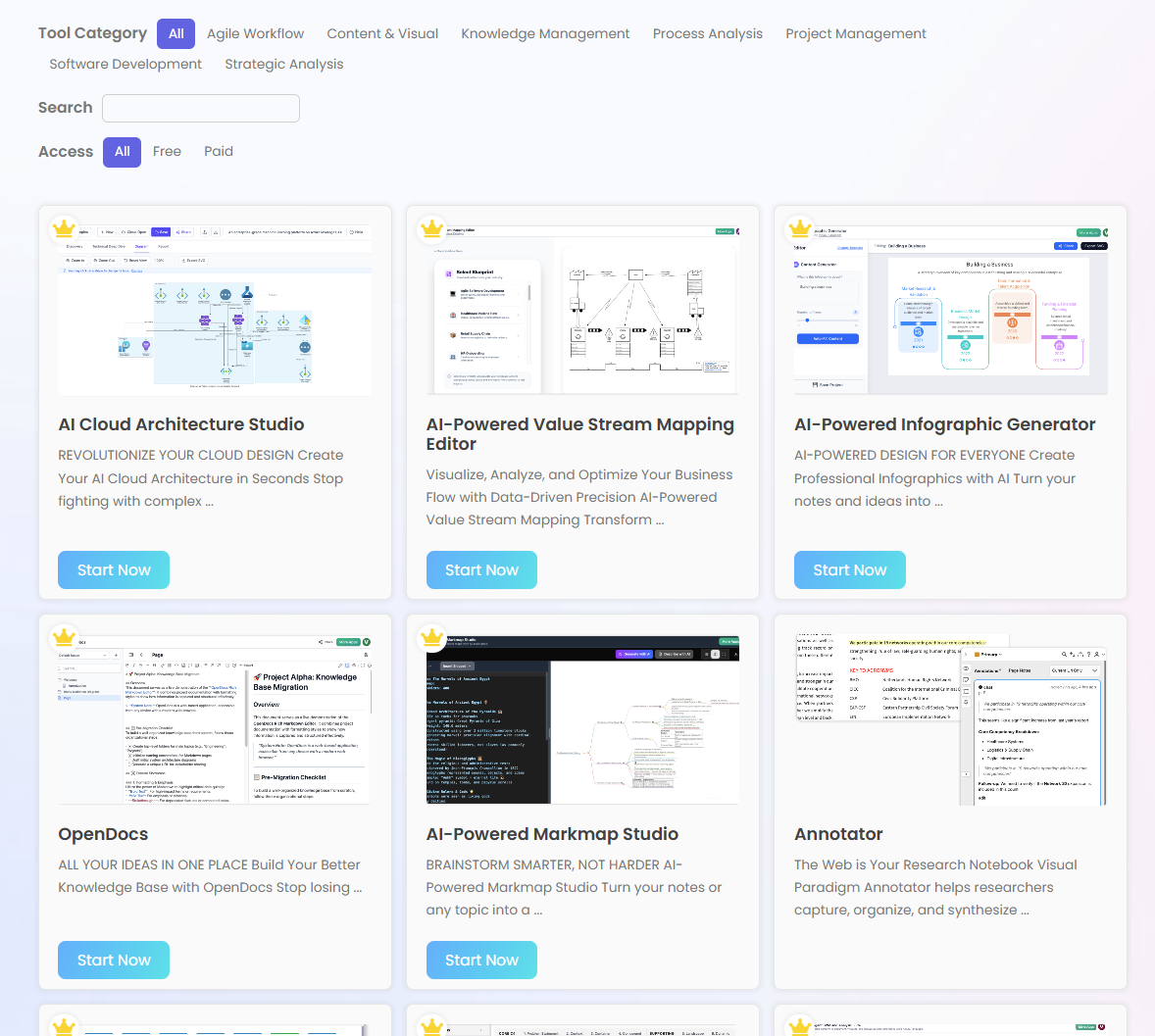
https://ai.visual-paradigm.com/
A step-by-step guided journey to build and evolve complex models with automated logic checks.
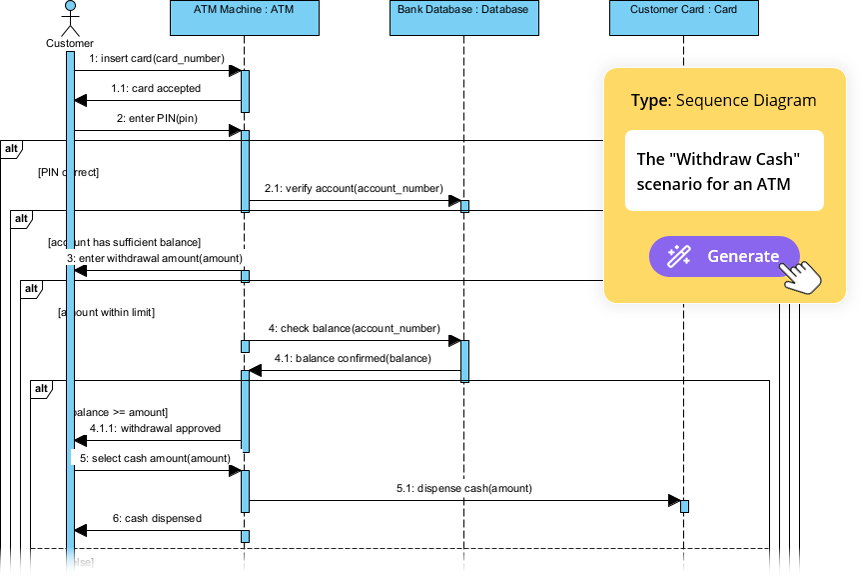
https://guides.visual-paradigm.com/visual-paradigm-ai-diagram-generation-guide/
Instantly generate UML diagrams with AI from natural language prompts.
https://ai.visual-paradigm.com/tool/opendocs
Document your system and maintain a clear version history of architectural rules in an AI-powered hub.
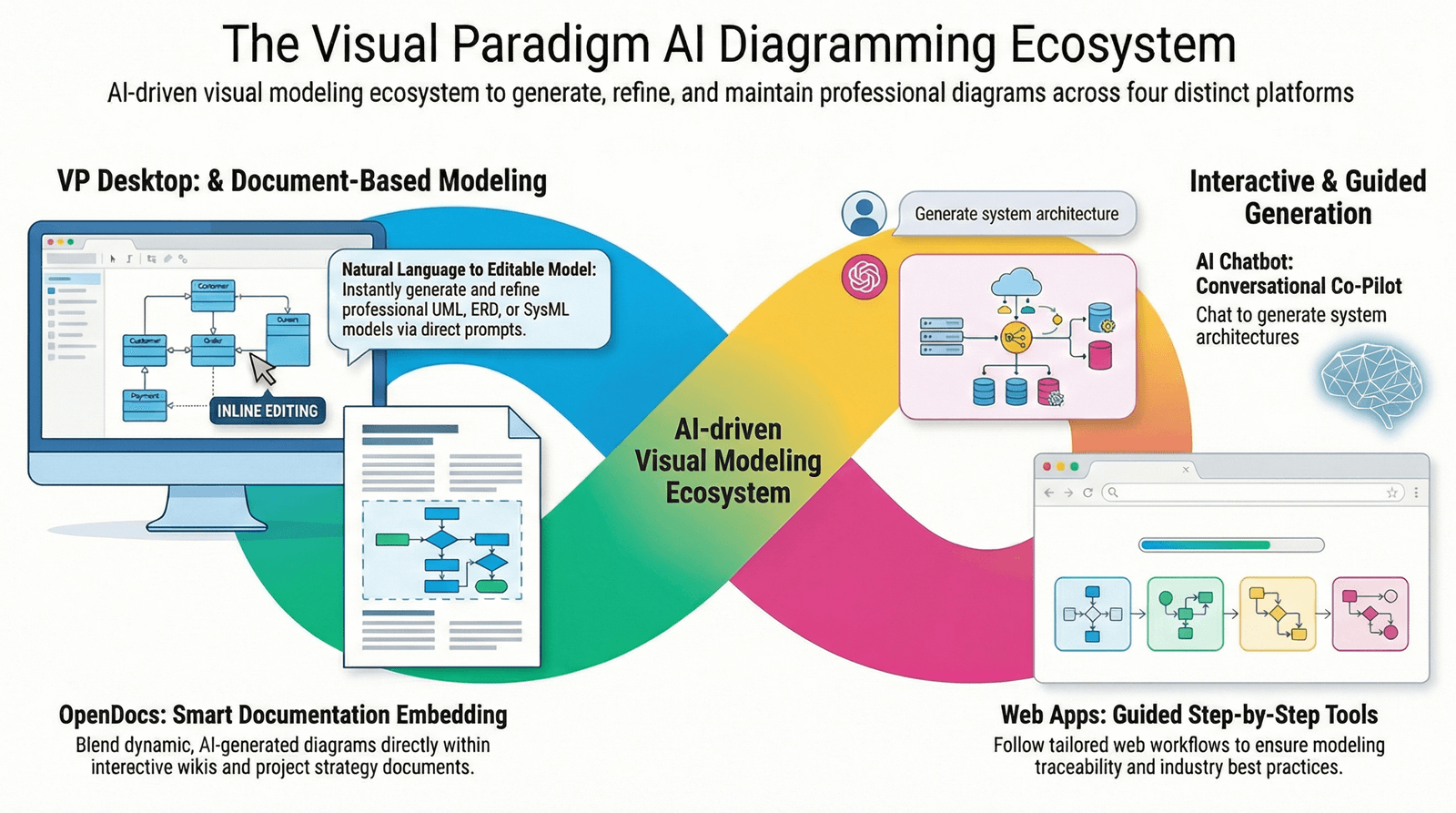
🔗 Explore the Complete AI Diagram Generation Ecosystem →
You can constrain class operations to enforce specific behavioral rules. For example, constrain an EventQueue class so that all additions maintain order:
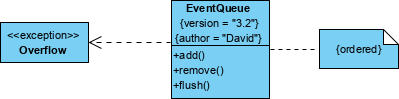
Implementation Example:
class EventQueue {
  +add(event: Event): void {ordered}
  +remove(): Event
}
The {ordered} constraint ensures events are processed in the sequence they were added.
💡 Pro Tip: Use operation constraints to enforce preconditions and postconditions:
{pre: self.size < maxSize}
{post: result ≠ null}
Notes provide a flexible mechanism to capture arbitrary comments and constraints that help illuminate your models. They can represent:
Requirements artifacts
Free-form observations
Review comments
Explanatory context
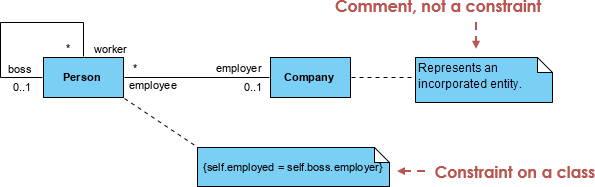
Best Practices for Note-Based Constraints:
✅ Use notes for constraints that span multiple elements
✅ Link notes to elements with dashed lines for clarity
✅ Keep note text concise but unambiguous
✅ Reference note IDs in formal documentation for traceability
Complex relationships often require nuanced constraints. Consider this organizational model:
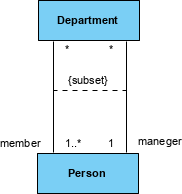
Model Interpretation:
Each Person may be a member of zero or more Departments
Each Department must have at least one Person as a member
Each Department must have exactly one Person as manager
Each Person may manage zero or more Departments
Constraint Notation:
{manager role: 1..1}
{member role: 0..*}
{cannot manage own department}  // Business rule constraint
Elements can have multiple constraints. List them sequentially within the same brace block or use separate blocks for clarity:
{salary >= minSalary} {salary <= maxSalary}
// or
{minSalary <= salary <= maxSalary}
Use parameters to make constraints reusable across similar elements:
{threshold: Integer}
context Account
inv: self.balance >= threshold
Constraints on superclass attributes/operations apply to subclasses unless explicitly overridden:
class Account {
  +balance: Decimal {>= 0}
}

class SavingsAccount extends Account
// Inherits {balance >= 0} constraint
Model time-dependent rules using state machine integration:
context Order
inv: self.status = 'Shipped' implies self.shipDate.oclIsDefined()
Specify that exactly one of several associations must hold:
{XOR}
Applied to associations to indicate mutual exclusivity
Visual Paradigm provides a comprehensive, professional-grade modeling environment that fully supports the UML 2.x standard, augmented by an AI-powered ecosystem for automated diagram generation and architectural analysis.
The platform supports all 14 standard UML diagrams, bridging the gap between requirements and implementation:
| Feature | Description |
|---|---|
| Standard Diagrams | Full support for Class, Use Case, Sequence, Activity, State Machine, Component, Deployment, Package, Object, Composite Structure, Timing, Interaction Overview, Communication, and Profile diagrams |
| Code Engineering | Bidirectional round-trip engineering: generate source code (Java, C++, PHP, Python, etc.) from diagrams or reverse-engineer existing code into UML models |
| Database Design | Synchronize Class diagrams with Entity Relationship Diagrams (ERD) and generate Hibernate ORM mapping tiers |
| IDE Integration | Operate directly within Eclipse, IntelliJ IDEA, NetBeans, Visual Studio, and Android Studio |
| Traceability & Linking | Model Transitor links elements across diagram types; sub-diagrams enable multi-level elaboration |
| Team Collaboration | Concurrent editing with automatic version control, conflict resolution, and PostMania cloud-based commenting |
The integrated AI engine acts as a “creative co-pilot,” transforming text-based requirements into actionable designs:
| AI Capability | Benefit |
|---|---|
| Instant Diagram Generation | Use natural language prompts to create Class, Sequence, State Machine, and Use Case diagrams instantly |
| Conversational Editing | Modify models via AI Chatbot: “Add a PaymentGateway class” or “Refactor Student into a superclass” |
| Architectural Analysis & Critique | AI performs quality checks, identifies design flaws (tight coupling, circular dependencies), and generates analysis reports |
| “Ask Your Diagram” | Query visual models as a knowledge base to generate summaries, proposals, or technical documentation |
| Design Pattern Mastery | Instruct AI to automatically apply patterns: Singleton, Factory, Observer, etc. |
Use OCL for critical, machine-checkable constraints – Ensures precision and enables automated validation
Keep natural-language constraints clear and unambiguous – Avoid jargon; use active voice
Place constraints close to the elements they constrain – Improves readability and reduces errors
Document complex constraints in accompanying notes – Provides context for team members
Validate constraints early in the design process – Catch logical errors before implementation
Use consistent naming conventions – {minValue}, {maxValue}, {required} improve scanability
Test constraints with sample data – Verify they behave as expected in edge cases
Over-constraining elements unnecessarily – Too many constraints reduce flexibility and maintainability
Mixing formal and informal notation without clear delineation – Causes confusion about enforceability
Placing constraints far from their target elements – Increases cognitive load and error risk
Using constraints to fix poor structural design – Address root causes, not symptoms
Writing overly complex OCL expressions – Break them into smaller, named constraints for clarity
Is the constraint logically consistent with the model?
Can the constraint be verified (manually or automatically)?
Is the notation clear to all stakeholders?
Does the constraint add value without over-complicating the model?
Are dependencies between constraints documented?
Have edge cases been considered in the constraint logic?
Is the constraint maintainable as requirements evolve?
| Trick | Application |
|---|---|
| Use named constraints | {validEmail: self.email.matches('[^@]+@[^@]+\\.[^@]+')} for reusability |
| Leverage derived attributes | {derived: self.total = items->sum(price)} to reduce redundancy |
| Combine with stereotypes | <<businessRule>> {salary > minWage} for categorization |
| Use comments in OCL | -- Ensure non-negative balance for documentation within formal constraints |
| Create constraint libraries | Reuse common patterns like {nonNull}, {unique}, {sorted} across projects |
Modeling constraints in UML is essential for creating precise, reliable, and maintainable system designs. Whether you use formal OCL expressions, semiformal notation, or natural language, constraints ensure your models enforce the rules that matter.
Key Takeaways:
Constraints are Boolean expressions that must always evaluate to true
Use curly braces {} for notation, placed near the constrained element
Choose the right level of formality: OCL for precision, natural language for accessibility
Leverage AI tools to accelerate constraint identification and formulation
Validate constraints early and document them clearly for team alignment
By leveraging modern tools like Visual Paradigm—with its comprehensive UML 2.x support and AI-powered assistance—you can:
✅ Model constraints more efficiently
✅ Validate business rules early in the development cycle
✅ Generate documentation and code automatically
✅ Collaborate effectively with technical and non-technical stakeholders
Start applying constraints thoughtfully in your next UML model, and watch your designs become more robust, communicative, and implementation-ready.
Visual Paradigm Platform: Comprehensive platform for visual modeling, UML support, business analysis, and AI-powered diagram generation with SWOT, PESTLE, and Business Canvas capabilities.
UML Tool Features: Detailed overview of Visual Paradigm’s UML modeling capabilities, including support for all 14 UML diagram types, code engineering, and team collaboration features.
UML Modeling User Guide: Official documentation for UML modeling in Visual Paradigm, covering constraint notation, diagram creation, and best practices.
UML Solution Overview: Enterprise-grade UML tool solution featuring model-driven development, round-trip engineering, and agile methodology support.
Visual Paradigm Editions: Comparison of Community, Standard, Professional, and Enterprise editions with feature matrices and licensing information.
AI Diagram Chatbot: Conversational AI tool for generating and editing UML diagrams using natural language prompts and interactive refinement.
Guide to AI-Powered UML Generation: Step-by-step tutorial for leveraging AI to accelerate UML diagram creation, constraint modeling, and architectural design.
AI Chatbot Features: Overview of AI-powered conversational modeling, including diagram generation, refactoring suggestions, and architectural analysis capabilities.
AI Diagram Generation: Features for instant UML diagram creation from text prompts, supporting Class, Sequence, Use Case, and State Machine diagrams.
UML Tutorial Video: Video demonstration of UML modeling techniques, constraint application, and AI-assisted design workflows in Visual Paradigm.
UML Class Diagram Guide with AI: Comprehensive guide to modeling system structure using AI-enhanced Class diagrams, including constraint specification and OCL integration.
AI-Assisted Class Diagram Generator: Web-based tool for generating UML Class diagrams with AI, featuring constraint suggestions, relationship inference, and export options.
UML Component Diagram with AI: Interactive guide to creating Component diagrams using AI, with support for interface constraints, dependency rules, and deployment specifications.