 Visual Paradigm Desktop |
  Visual Paradigm Online


Visual Paradigm’s AI Chatbot brings natural language interaction to UML modeling. It helps users generate, refine, and validate diagrams with minimal manual effort—ideal for both beginners and experienced architects.
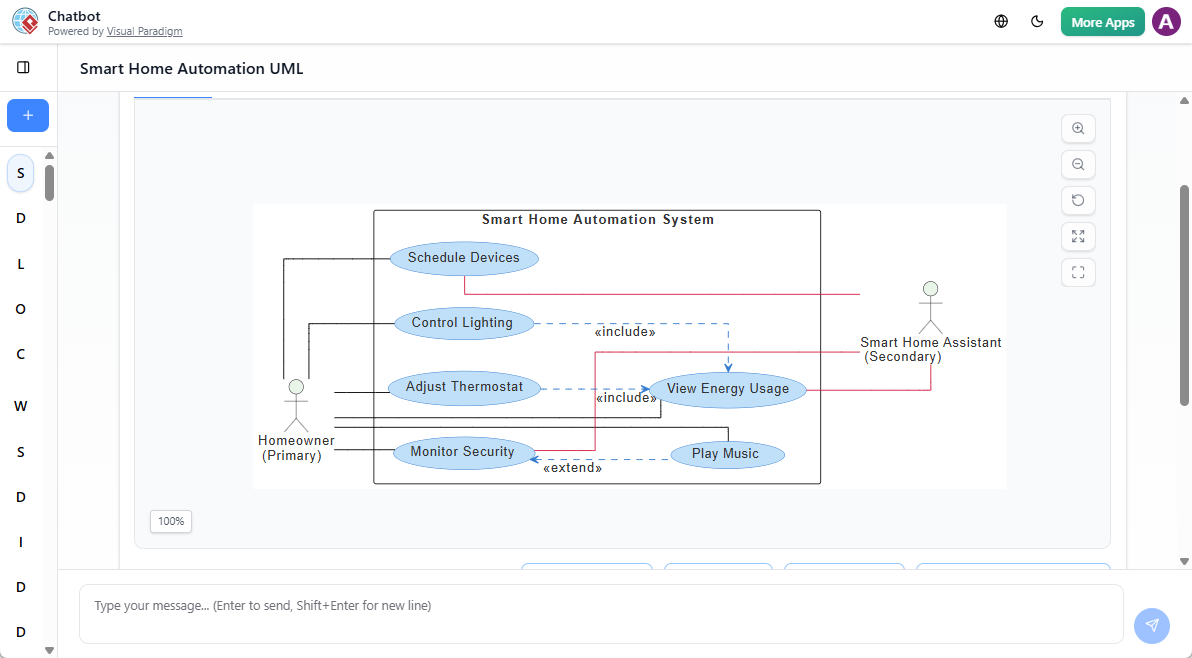
Whether you’re drafting a system architecture or validating design logic, the chatbot acts as a conversational co-pilot throughout the modeling lifecycle.
The AI Chatbot supports over 20 UML diagram types across all core categories:
This breadth ensures you can model any aspect of a system—from class relationships to runtime behavior—using plain language.
💡 Tip: You can generate a full deployment diagram for an IoT home automation system by describing the hardware and communication flows in natural language.
Describe your system in simple terms:
“Create a sequence diagram for a user login where the mobile app sends credentials and the server validates them.”
The AI generates a correct, standards-compliant diagram with lifelines, messages, and proper timing.
Refine your diagram in real time using natural language:
No need to manually edit nodes—changes are applied instantly.
Beyond diagram creation, the AI provides actionable feedback:
These features support deeper design discussions and improve documentation quality.
Diagrams created in the AI Chatbot are not static images. They’re fully editable models that can be:
This ensures your AI-generated models remain part of a live development workflow.
🔄 You can start with a prompt, refine it conversationally, then export it for detailed design or implementation.
Try these to test the AI’s capabilities:
These prompts work across all supported diagram types and produce immediate, accurate results.
While many tools offer basic diagram generation, Visual Paradigm’s AI Chatbot stands out by combining natural language input, real-time iteration, and architectural validation. It’s particularly useful for teams adopting model-driven development or documenting complex systems.
It also supports AI data flow diagram (DFD) generation through its broader modeling engine, making it a viable AI DFD tool for process modeling in software and business systems.
📌 Note: Although DFDs aren’t part of UML, the underlying AI engine can interpret functional descriptions and generate structured diagrams that align with DFD principles.