 Visual Paradigm Desktop |
  Visual Paradigm Online


Product Owners often face a landscape filled with technical jargon and abstract models. Among the most common artifacts encountered is the Use Case Diagram. While powerful, this tool is frequently misunderstood. Misinterpretations can lead to wasted time, misaligned expectations, and friction between business and technical teams. This guide strips away the confusion to reveal what these diagrams actually represent and how to leverage them effectively.
Understanding the true purpose of these diagrams is essential for anyone responsible for shaping product direction. It is not about drawing pretty pictures; it is about defining scope and boundaries clearly. Let us explore the reality behind the symbols.
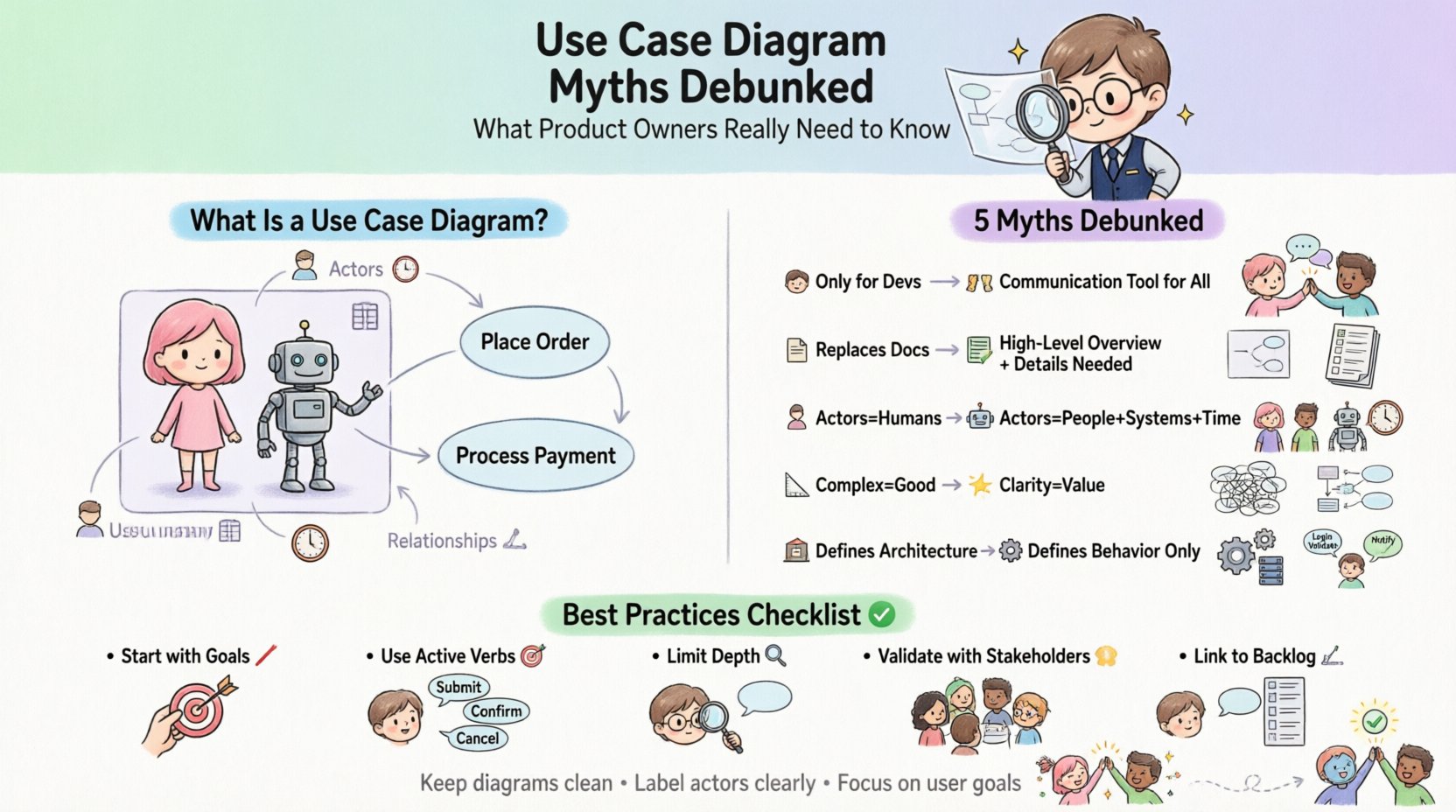
A Use Case Diagram is a visual representation of the functional requirements of a system. It depicts how users (actors) interact with the system to achieve specific goals. It focuses on what the system does, not how it does it.
Key components include:
For a Product Owner, this diagram serves as a communication bridge. It translates business goals into system capabilities without getting bogged down in implementation details.
Many assume that diagrams belong solely to the engineering team. This belief limits the Product Owner’s involvement in the architectural understanding.
Developers need this information to build, but stakeholders need it to verify. If a Product Owner cannot read a Use Case Diagram, they may approve features that are technically unfeasible or miss critical dependencies.
Do not delegate the review of this diagram to a Project Manager alone. Sit down with the architects. Ask questions about the actors. Ensure the system boundary matches the product vision. If a stakeholder is an actor, does the system support their specific workflow?
There is a tendency to treat the diagram as the single source of truth. Some believe that if it is drawn, the requirements are defined.
A diagram is a map, not the territory. It shows the high-level landscape. It does not describe the steps taken within a use case, the error handling, or the data validation rules.
Without detailed specifications, the diagram is insufficient. You need:
Use the diagram to organize your backlog. Link user stories to specific use cases. Ensure every bubble on the diagram has corresponding acceptance criteria. Do not let the visual shorthand become a lazy substitute for clarity.
The most persistent misconception is that every stick figure represents a person. This limits the understanding of system integrations.
An actor is any external entity that interacts with the system. This includes:
Tooling often defaults to human icons. Teams forget to switch to system icons for APIs. This leads to underestimating integration complexity.
Label your actors clearly. If it is an external API, label it as such (e.g., “Payment Provider”). This signals to the development team that they need to manage interfaces, not just build UI screens. Ensure the Product Owner understands the cost of maintaining these external relationships.
Some teams believe that a dense diagram with hundreds of lines proves thoroughness. They aim for maximum connectivity.
Complexity obscures value. If a diagram is too crowded, it becomes unreadable. The goal is clarity, not completeness of every edge case.
Aim for a single-page overview if possible. If the diagram spills over, use system decomposition. Create a master diagram for the whole product, then detailed diagrams for specific modules. Simplicity is a feature of good requirements engineering.
There is a belief that this diagram dictates the database schema, UI layout, or code structure.
Use Case Diagrams are behavioral. They describe interaction. They do not describe data structures or physical deployment. Confusing behavior with architecture leads to rigid designs that cannot adapt to change.
Do not use this diagram to plan technical infrastructure. Use it to plan user value. Keep the architectural decisions separate. Ensure the technical team knows that the diagram is a contract for functionality, not a blueprint for implementation.
| Myth | Fact | Impact on Product Owner |
|---|---|---|
| Actors are only people | Actors include systems and time | Accurate estimation of integration effort |
| Diagram = Full Requirements | Diagram = High-Level Overview | Need for detailed user story mapping |
| Complexity = Value | Clarity = Value | Focus on simplifying scope |
| Only for Developers | Communication Tool for All | Active participation in design reviews |
| Defines Architecture | Defines Behavior | Separate functional and technical planning |
Even with the myths debunked, Product Owners often stumble on specific execution details. Being aware of these pitfalls helps maintain momentum.
When the boundary is fuzzy, scope creep becomes inevitable. If a feature is just outside the box, it might be treated as out of scope. If it is just inside, it might be over-engineered. Clearly mark the line. Discuss what happens to data when it crosses that line.
Do not mix “Login” with “Calculate Tax” in the same diagram if one is a system capability and the other is a business process. Keep the granularity consistent. If “Calculate Tax” is a use case, ensure “Login” is treated with the same weight.
Diagrams often show the ideal flow. However, the Product Owner must ensure that error handling is considered. Does the diagram show what happens when the payment gateway fails? If not, add a use case for “Handle Error” or ensure the description covers it.
A diagram created at the start of a project is often outdated by the next sprint. As the product evolves, the actors and use cases change. Treat the diagram as a living document. Update it when the scope shifts significantly.
To get the most value from this artifact, adopt these disciplined approaches.
Not every project needs a Use Case Diagram. Applying it blindly adds overhead.
One of the most effective ways to bridge the gap between diagram and backlog is to link them directly.
For example:
This ensures that the visual model is not an isolated artifact. It drives the actual work. The Product Owner acts as the translator between the visual model and the written requirements.
Mastering the Use Case Diagram is less about drawing skills and more about thinking skills. It requires the discipline to define boundaries, the humility to admit what is out of scope, and the confidence to communicate complex interactions simply.
As a Product Owner, your goal is value delivery. These diagrams are a tool to protect that value from scope creep and misalignment. Use them to clarify, not to complicate. By understanding the myths and focusing on the reality, you can ensure that your team builds exactly what the business needs, without the friction of ambiguity.
Keep your diagrams clean, your actors labeled, and your focus on the user goal. That is the path to effective requirements engineering.