 Visual Paradigm Desktop |
  Visual Paradigm Online


The landscape of software architecture is shifting beneath our feet. For decades, the Use Case Diagram has served as the primary blueprint for defining system behavior and stakeholder interactions. It is a staple of the Unified Modeling Language (UML), designed to capture the functional requirements of a system in a visual format. However, as Artificial Intelligence becomes deeply integrated into the product development lifecycle, the static nature of traditional diagrams is being challenged. We are witnessing a transition from manual modeling to intelligent, adaptive system definition. This shift does not discard the value of the Use Case Diagram; rather, it augments its capabilities, allowing for greater precision, faster iteration, and deeper alignment with complex business logic. 🧠
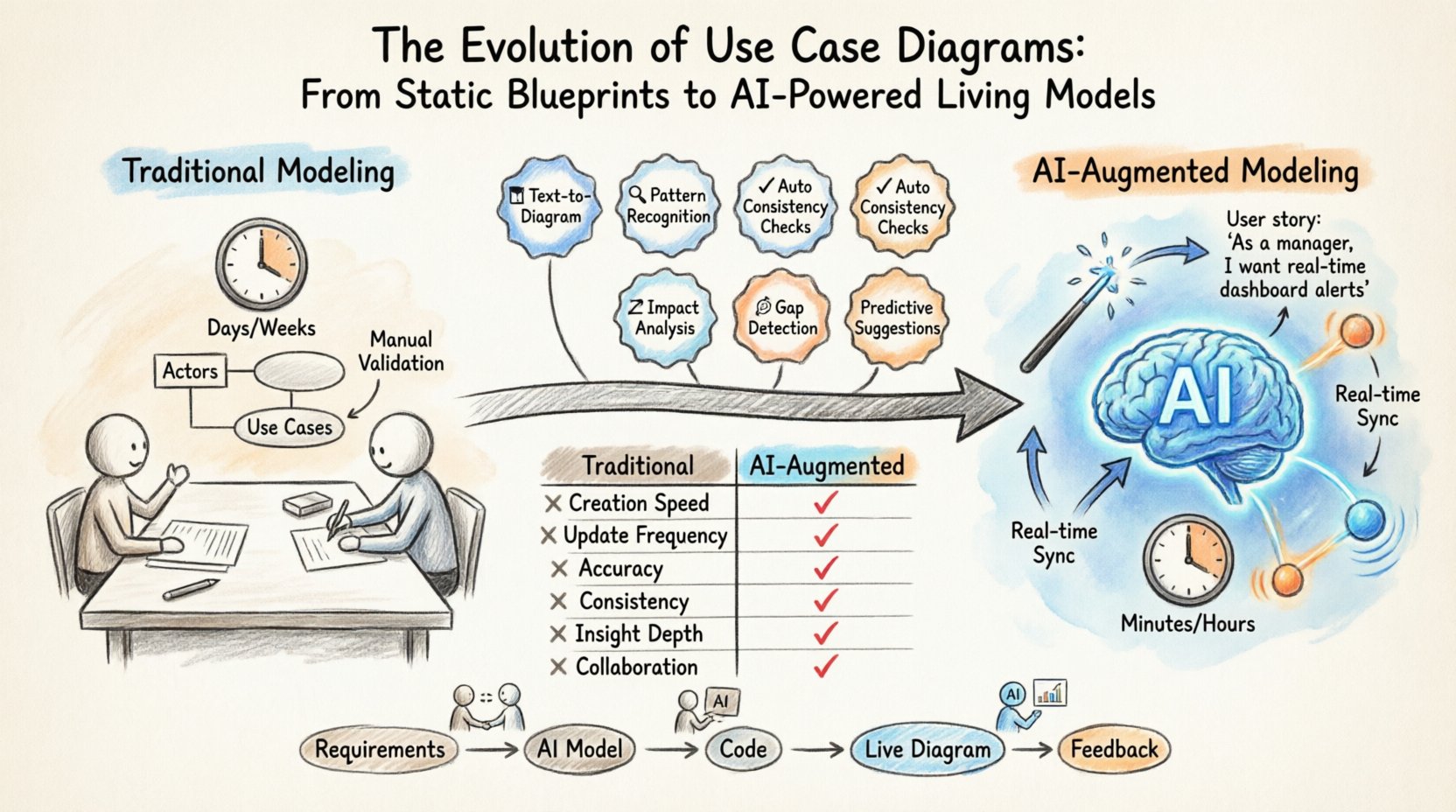
Before exploring the future, it is essential to ground ourselves in the present and past utility of these diagrams. A Use Case Diagram provides a high-level overview of how users (actors) interact with a system to achieve specific goals (use cases). It is distinct from class diagrams or sequence diagrams because it focuses on what the system does, not how it does it internally.
Traditionally, creating these diagrams involves a collaborative process between business analysts, architects, and developers. The workflow typically follows these steps:
This process has proven effective for decades, but it is inherently manual and prone to latency. As product cycles accelerate, the time required to manually update diagrams often lags behind the actual development velocity. This gap creates technical debt where the documentation no longer reflects the codebase. The integration of AI addresses this disconnect directly.
Artificial Intelligence brings a new layer of intelligence to the modeling phase. It is not merely about drawing shapes faster; it is about understanding context. Natural Language Processing (NLP) models can parse unstructured requirement documents, user stories, and even audio transcripts from stakeholder meetings to extract functional intent. This capability transforms the diagram from a static artifact into a dynamic representation of system logic.
Here is how AI fundamentally changes the modeling workflow:
This shift moves the role of the modeler from a drafter to a reviewer. The human element remains critical for judgment and ethical considerations, but the heavy lifting of construction is increasingly automated.
The most immediate impact of AI on Use Case Diagrams is automation. In a traditional setting, a modeler must manually place actors and connect them to use cases. In an AI-driven environment, the system can propose the structure based on the input data. This is particularly useful in large-scale enterprise systems where the number of actors and interactions can become overwhelming.
Consider a scenario where a product team is building a financial application. The requirements document lists ten different user roles and fifty potential actions. Manually mapping these relationships takes days. An intelligent modeling tool can ingest the document, identify the entities, and generate a draft diagram in minutes. The modeler then focuses on refining the logic and verifying the relationships.
This level of automation does not replace the architect. Instead, it provides a starting point that is logically sound, allowing the human to focus on business value and edge cases. It reduces the cognitive load required to maintain documentation.
One of the most significant evolutions is the move from static diagrams to dynamic models. Traditional Use Case Diagrams are snapshots in time. Once the code is deployed, the diagram often becomes outdated. AI enables diagrams that can evolve alongside the software.
By integrating with version control systems and code repositories, AI-driven modeling tools can monitor changes in the codebase. If a new function is added to the backend, the system can suggest an update to the Use Case Diagram to reflect this new capability. This creates a living documentation environment.
Additionally, predictive modeling allows us to anticipate future needs. AI can analyze usage logs and user behavior to suggest new use cases. For example, if users frequently perform a specific sequence of actions that are not currently modeled as a single use case, the AI might suggest consolidating them or adding a new interaction path. This ensures the system design evolves based on actual usage patterns rather than just initial assumptions.
| Feature | Traditional Modeling | AI-Augmented Modeling |
|---|---|---|
| Creation Speed | Days to weeks | Hours to minutes |
| Update Frequency | Infrequent (Versioned) | Continuous (Real-time) |
| Accuracy | Dependent on human skill | Validated against data |
| Consistency | Manual checks required | Automated consistency rules |
| Insight Depth | Static requirements | Predictive and behavioral |
| Collaboration | Separate documentation | Integrated with workflow |
While the potential is vast, integrating AI into system modeling introduces specific challenges that organizations must navigate. The technology is not infallible, and relying on it without oversight can lead to significant issues.
Generative AI models can sometimes produce plausible but incorrect information. In the context of modeling, this might mean suggesting a use case that does not align with business rules or creating relationships between actors that should not exist. It is vital to maintain a human-in-the-loop process where an expert validates the AI’s output before it is committed to the project baseline.
Feeding sensitive requirement documents and system architecture details into external AI models raises security concerns. Organizations must ensure that any AI tools used adhere to strict data governance policies. Sensitive business logic should not be exposed to public models. Local processing or enterprise-grade solutions with data isolation are necessary.
AI excels at pattern matching but may struggle with unique business contexts. Some requirements are highly specific to an organization’s culture or legacy constraints. An automated model might standardize these unique needs into generic patterns, losing the nuance that makes the system fit its specific environment. Human judgment remains essential for contextualizing the model.
Looking ahead, the workflow for product development will become more seamless. The separation between design, modeling, and coding will blur. Use Case Diagrams will become part of a continuous feedback loop.
This integration reduces the silo effect. Business analysts, developers, and testers will all reference the same living model. This alignment ensures that everyone is working toward the same definition of the system, reducing rework and miscommunication.
As the tools change, the skills required for system architects and business analysts must also evolve. The ability to draw perfect shapes is becoming less relevant than the ability to interpret AI output and guide the system design.
Key skills for the future include:
Training programs and educational resources will need to adapt to reflect this new reality. The focus will shift from learning tool-specific syntax to understanding the principles of system modeling and the capabilities of intelligent automation.
Quality Assurance teams stand to benefit significantly from AI-evolved Use Case Diagrams. Test cases are often derived directly from use cases. If the use cases are accurate and up-to-date, the test suite is more robust. AI can generate comprehensive test scenarios based on the diagram, including edge cases that humans might miss.
Furthermore, as the diagram evolves dynamically, the test suite can automatically update. If a new use case is added, the system can propose new test scripts. This ensures that testing coverage remains high throughout the development lifecycle, preventing regression bugs from slipping through.
Adopting AI-driven modeling is not just a technical upgrade; it is a strategic advantage. Teams that leverage these tools can ship products faster with higher confidence. They can iterate on requirements without the overhead of maintaining outdated documentation. This agility is crucial in competitive markets where time-to-market determines success.
Additionally, better documentation means better onboarding for new team members. A living, AI-maintained diagram serves as a clear map of the system, reducing the ramp-up time for new engineers. This improves retention and productivity within the team.
The journey of the Use Case Diagram is far from over. It is merely entering a new chapter. From a static drawing tool to an intelligent system modeler, its role is expanding. The core purpose remains the same: to define what the system should do. But the method of achieving this definition is becoming more powerful, accurate, and integrated.
Organizations that embrace this evolution will find themselves better equipped to handle complexity. They will spend less time drawing boxes and more time solving problems. The future of system modeling is collaborative, intelligent, and dynamic. By accepting these changes, product teams can build software that is not only functional but also adaptable to the rapidly changing digital landscape. The diagram is no longer just a picture of the system; it is a reflection of the system itself.