 Visual Paradigm Desktop |
  Visual Paradigm Online


In modern software development, the path from idea to deployed application is rarely a straight line. It is a complex journey filled with requirements, specifications, and user needs that must be understood before a single line of code is written. Two of the most common artifacts used to capture these requirements are the use case diagram and the user story. While both aim to define functionality, they operate from different perspectives and serve distinct purposes within the development lifecycle.
Choosing between them, or deciding how to integrate both, can significantly impact the velocity and quality of your delivery. This guide explores the nuances of each method, providing a clear framework for decision-making.
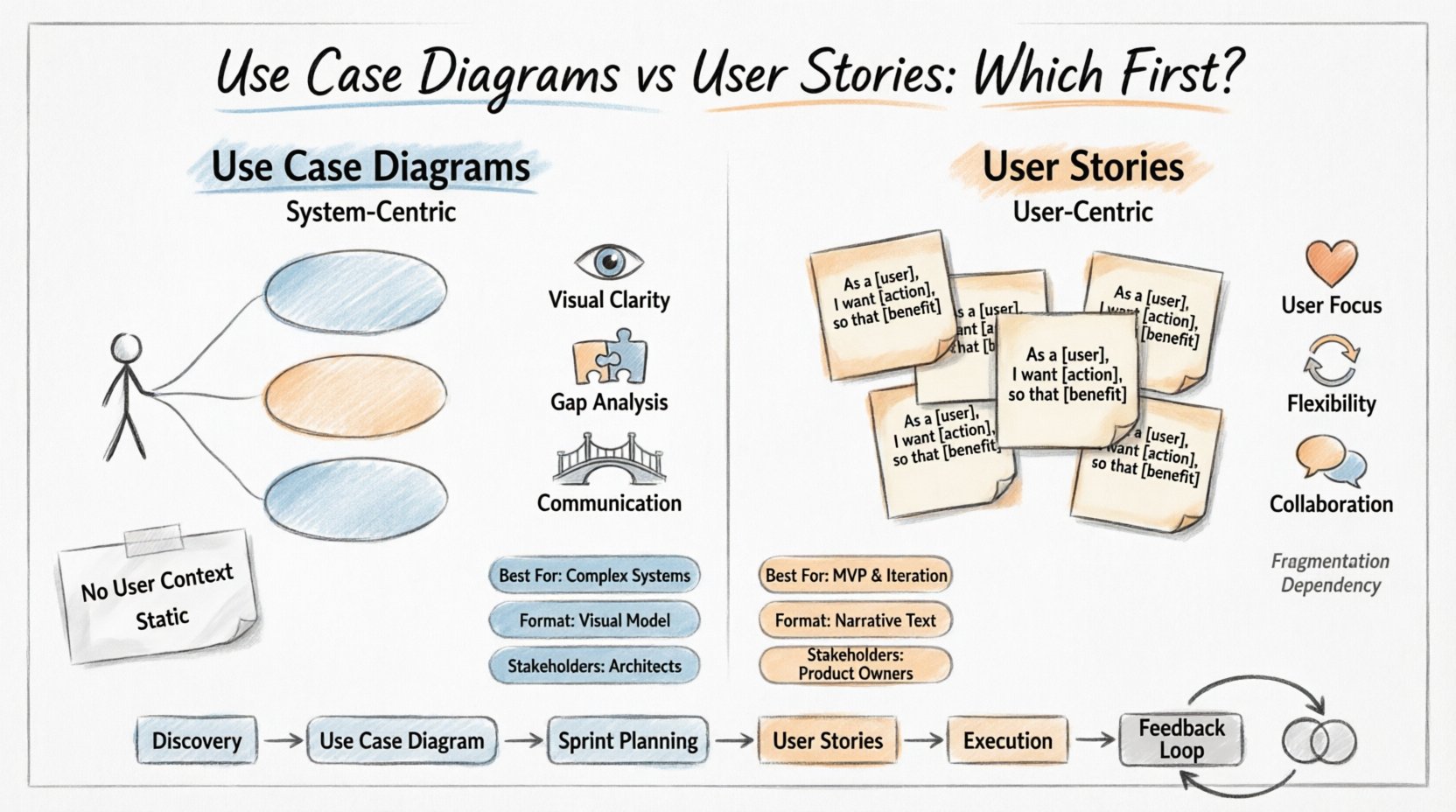
A use case diagram is a visual representation of the interactions between a system and its external actors. It provides a high-level overview of the system’s functionality. Think of it as a map of the capabilities available within the software, focusing on what the system does rather than how the user feels about it.
These diagrams are rooted in Object-Oriented Analysis and Design (OOAD). They are particularly useful for understanding the scope of a system and identifying the boundaries of the software. In a use case diagram, you will typically see:
The primary strength of the use case diagram lies in its ability to capture system behavior from a functional perspective. It answers the question: “What can the system do?” This makes it invaluable during the requirements gathering phase, especially for complex systems with multiple external interfaces.
A user story is a lightweight description of a feature told from the perspective of the person who desires the new capability. It shifts the focus from system functionality to user value. The standard format for a user story is:
“As a [type of user], I want [an action], so that [a benefit].”
Unlike the static nature of a diagram, a user story is a placeholder for a conversation. It is not a complete specification but a promise to talk about the requirement later. Each story is typically accompanied by acceptance criteria, which define the conditions that must be met for the story to be considered complete.
Key characteristics of user stories include:
The user story model is a cornerstone of Agile methodologies. It prioritizes flexibility and adaptability over rigid upfront documentation. It answers the question: “What value does the user get?”
Understanding the distinctions is vital for effective planning. The following table outlines the fundamental differences between these two artifacts.
| Feature | Use Case Diagram | User Story |
|---|---|---|
| Focus | System functionality and boundaries | User needs and value |
| Format | Visual Model (Diagram) | Narrative (Text) |
| Perspective | System-centric | User-centric |
| Detail Level | High-level overview | Specific implementation details (via criteria) |
| Best Used For | Complex system architecture, external integrations | Feature development, sprint planning |
| Change Flexibility | Harder to modify once drawn | Easy to adapt and refine |
| Stakeholder | Architects, System Analysts | Product Owners, Developers, End Users |
When working on enterprise-grade systems or software with complex logic, the use case diagram offers a structured way to visualize the ecosystem. It helps architects and analysts ensure that no critical functionality is overlooked before development begins.
User stories drive the day-to-day work in most Agile teams. They break down large features into manageable chunks that can be built, tested, and released incrementally.
In an Agile environment, the choice is rarely binary. Many successful teams utilize a hybrid approach, leveraging the strengths of both artifacts at different stages of the project.
During the initial discovery phase, a use case diagram is often the better starting point. It helps define the scope of the project. If you are building a banking application, for instance, you need to know all the actors (Customer, Bank Teller, Third-Party Fraud System) and the major functions (Transfer Funds, Check Balance, Report Fraud). This macro view ensures that the architecture is sound before work begins.
Once the scope is defined, the work moves to user stories. The high-level use cases are broken down into specific user stories. For example, the “Transfer Funds” use case might generate stories like “As a customer, I want to select a recipient” and “As a system, I must validate account balances.” This allows the team to prioritize work based on value and technical feasibility.
As development proceeds, user stories drive the daily workflow. The use case diagram serves as a reference point to ensure that the cumulative work aligns with the original system design. If a new requirement emerges, the team checks the diagram to see if it fits the intended architecture.
Deciding which to use first depends heavily on the nature of the project. Here are specific scenarios to guide your decision.
The most robust strategy often involves using both. This creates a dual-layer documentation strategy that satisfies both technical and business needs.
For every user story created, there should be a corresponding use case identified in the diagram. This ensures traceability. If a story is removed from the backlog, you can verify if it impacts a critical system function. This linkage helps prevent “feature creep” where too many small changes dilute the core system integrity.
Creating a simple matrix that links Use Case IDs to User Story IDs can be highly effective. This allows stakeholders to see which specific user needs are being met by the system functions defined in the architecture. It also helps QA teams ensure that every function in the diagram has a corresponding test case derived from user stories.
Even with the right tools, teams can stumble in their approach. Avoid these common pitfalls to maintain clarity and efficiency.
Yes, particularly in traditional waterfall projects. However, in Agile, relying solely on diagrams can slow down delivery. Diagrams are better suited for system design, while stories drive execution.
They do not replace them entirely. Stories handle the user value and specific implementation details. Use cases handle the system boundaries and external interactions. They complement each other.
It should be high-level enough to be understood by business stakeholders but detailed enough to inform system architecture. Avoid including internal processes that do not interact with actors.
The Product Owner is primarily responsible for the user stories, defining value and priority. However, they should collaborate with architects to ensure the use case diagram aligns with business goals and system feasibility.
Mobile apps often benefit from user stories due to the need for rapid iteration and user feedback. However, if the app relies on complex backend services, a use case diagram helps manage those dependencies.
Selecting between use case diagrams and user stories is not about finding a winner. It is about understanding the tools available for your specific context. Use case diagrams provide the skeleton of your system, ensuring stability and scope. User stories provide the flesh and blood, ensuring value and adaptability.
By recognizing when to apply each tool, your team can navigate the complexities of software development with greater confidence. Whether you start with a diagram to map the landscape or a story to define the journey, the goal remains the same: building software that meets user needs effectively.
Consider your project constraints, team size, and system complexity. If the system is complex, lean on the diagram. If the product is user-driven, lean on the story. In many cases, the most effective path involves weaving both together, using the diagram to guide the architecture and the stories to drive the sprint.
Ultimately, the best documentation is the documentation that is actually used. Ensure that whichever method you choose, it facilitates communication rather than hindering it. Keep your artifacts living, breathing parts of your process, and your development velocity will follow.