 Visual Paradigm Desktop |
  Visual Paradigm Online


Building a successful product in today’s digital landscape requires more than just a list of features and a deadline. It demands a clear understanding of how users interact with the system, what value they derive, and how technical constraints shape the journey. At the heart of this alignment lies a specific visual tool often overlooked in fast-paced environments: the use case diagram. While agile methodologies emphasize speed, skipping the structural analysis provided by use cases can lead to significant rework, scope creep, and misaligned stakeholder expectations.
This guide explores the critical role of use case diagrams in shaping modern product roadmaps. We will move beyond basic definitions to understand how these diagrams function as a strategic bridge between business goals and technical execution. By the end, you will see why incorporating these diagrams is not an administrative burden, but a fundamental necessity for clarity and precision.
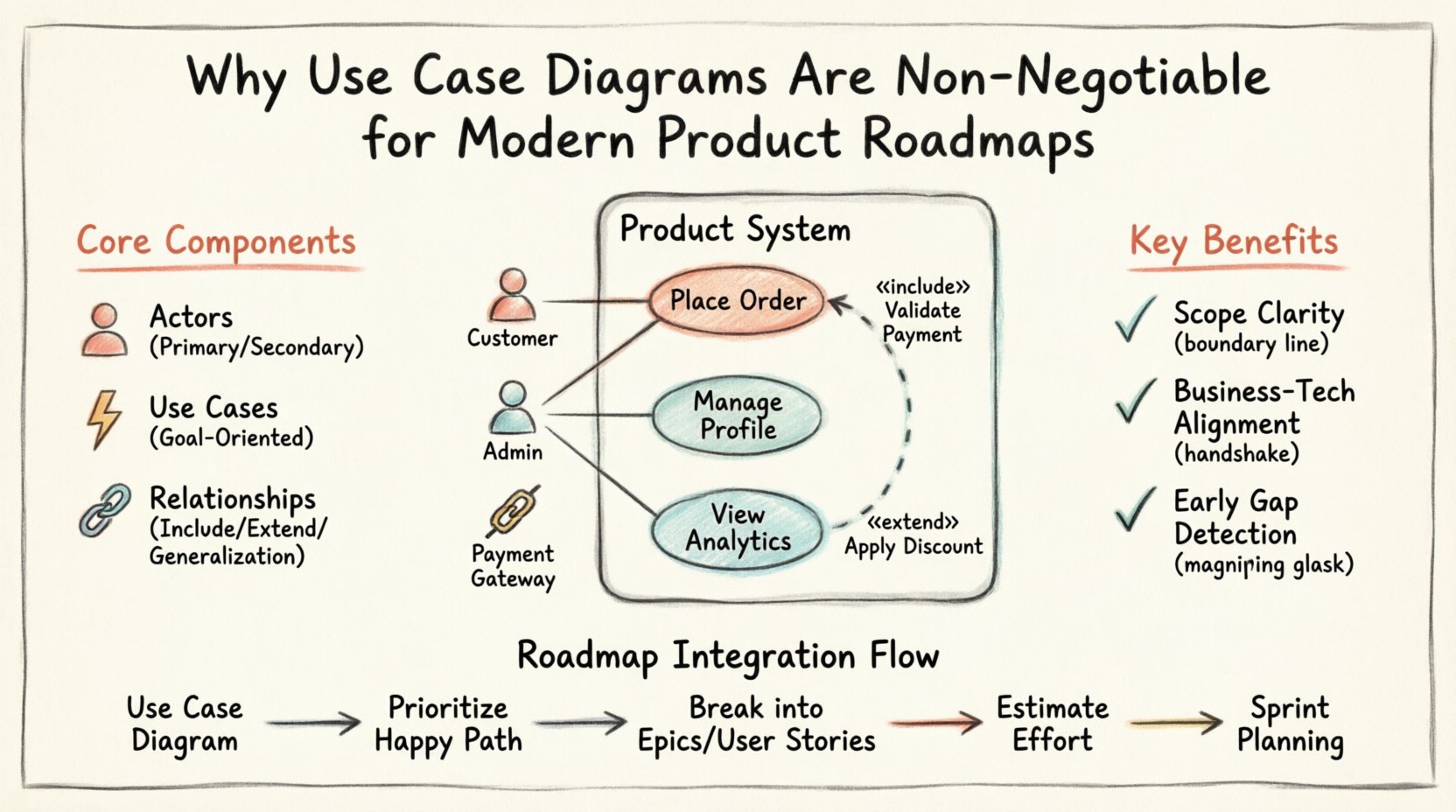
A use case diagram is a visual representation of the interactions between a system and its external entities. It focuses on the functional requirements from the perspective of the end user. Unlike flowcharts that detail the internal logic of a process, or wireframes that show the visual layout of a screen, use case diagrams answer the question: What can the user do with this system?
In the context of product planning, these diagrams serve as a high-level blueprint. They define the boundary of the system and identify the actors who interact with it. This distinction is vital for roadmap planning because it separates internal mechanics from external value delivery.
Key characteristics include:
To leverage these diagrams effectively for roadmapping, one must understand the building blocks. Misinterpreting these components can lead to flawed planning. Below are the essential elements that form the structure of the analysis.
An actor represents a role that interacts with the system. Actors are not specific individuals but roles defined by their relationship to the system. Understanding the actor helps in prioritizing roadmap items based on user segments.
A use case is a specific goal that an actor wants to accomplish. It is a complete flow of interaction. In roadmap terms, a use case often maps to an Epic or a large feature set.
The lines connecting actors and use cases define the nature of the interaction. Understanding these relationships helps in sequencing roadmap items.
Product roadmaps are often criticized for being wish lists of features. Using case diagrams transform these lists into structured plans. Here is how they contribute directly to the roadmap process.
One of the biggest challenges in product development is scope creep. When requirements are vague, stakeholders assume features are included that were never planned. A use case diagram draws a literal line in the sand.
Developers think in terms of logic and data. Business stakeholders think in terms of value and user needs. Use case diagrams act as a common language. They translate business requirements into system actions that engineers can understand without getting bogged down in code implementation details.
When mapping out use cases, gaps in logic often become visible immediately. You might realize that a user can start an action but has no way to complete it. Identifying these gaps during the planning phase saves significant resources during development.
To illustrate the impact of this approach, consider the differences between a roadmap built with and without this structural analysis.
| Aspect | Without Use Case Diagrams | With Use Case Diagrams |
|---|---|---|
| Scope Clarity | Vague; prone to assumptions and expansion. | Defined boundaries; clear inclusion/exclusion. |
| Stakeholder Alignment | High risk of miscommunication between teams. | Visual reference point for all discussions. |
| Risk Management | Risks discovered late during testing. | Risks identified during planning phase. |
| Development Flow | Fragmented; potential for broken user flows. | Logical sequencing based on actor goals. |
| Testing Strategy | Focuses on individual components. | Focuses on end-to-end user scenarios. |
Once the diagram is created, how does it translate into a timeline? The integration requires mapping the visual elements to planning artifacts.
Not all use cases are created equal. Some are foundational (Must Have), while others are enhancements (Nice to Have). Use the diagram to group use cases by actor and goal.
A use case often serves as the parent container for multiple User Stories. This hierarchy helps in breaking down the roadmap into manageable sprints.
Understanding the complexity of the interactions helps in effort estimation. A simple association line might take less time than a complex include relationship involving external systems.
Even with the best intentions, teams can misuse these diagrams. Awareness of common mistakes ensures the roadmap remains accurate.
In modern product development, workflows are rarely linear. Agile and DevOps practices require flexibility. How do use case diagrams fit into iterative cycles?
Instead of a static document created at the start, the diagram should be a living artifact. As you release features, update the diagram to reflect the current state of the system. This ensures that the roadmap always matches reality.
During sprint planning, teams can reference the diagram to ensure they are building complete flows. If a developer picks up a task related to “Checkout,” the diagram confirms if “Payment Verification” is also in scope for that iteration.
User feedback from released features might reveal missing actors or use cases. For example, users might start using the system in a way that wasn’t anticipated, requiring a new actor role or interaction. The diagram captures this evolution.
To get the most out of this methodology, follow these guidelines.
As technology evolves, the way we build products changes. However, the need to understand user interaction remains constant. Whether you are building for mobile, web, or emerging technologies like voice interfaces, the fundamental goal of the user remains the same.
Using case diagrams provide a stable foundation amidst changing technical landscapes. They allow you to swap out the underlying technology without losing sight of the user’s needs. This stability is crucial for long-term product health.
Furthermore, as products become more complex with microservices and APIs, the “Actor” concept expands. Automated scripts and third-party integrations become actors themselves. A robust diagram structure accommodates this growth, ensuring that your roadmap remains valid even as the system architecture shifts.
Creating a product roadmap is an exercise in commitment. You are promising value to users and resources to your team. Use case diagrams provide the evidence that this promise is grounded in reality. They force a level of scrutiny that prevents vague promises from becoming broken products.
By investing time in defining these interactions upfront, you reduce the friction between planning and execution. You create a shared vocabulary that prevents misunderstandings. You build a roadmap that is not just a timeline, but a map of user value. In a competitive market, clarity is a distinct advantage. Prioritizing structural analysis ensures that the path you chart is the one your team can actually walk.