 Visual Paradigm Desktop |
  Visual Paradigm Online


Product ownership is fundamentally about understanding the “why” behind every feature and ensuring that technical work delivers tangible business value. While user stories and backlog items are standard tools for managing work, they often lack a high-level view of how users interact with the system as a whole. This is where a Use Case Diagram becomes an invaluable asset.
For a Product Owner, visualizing the ecosystem of interactions helps clarify scope, identify missing requirements, and facilitate clearer communication with development teams and stakeholders. This guide provides a comprehensive overview of how to leverage these diagrams effectively without getting bogged down in overly technical modeling methodologies.
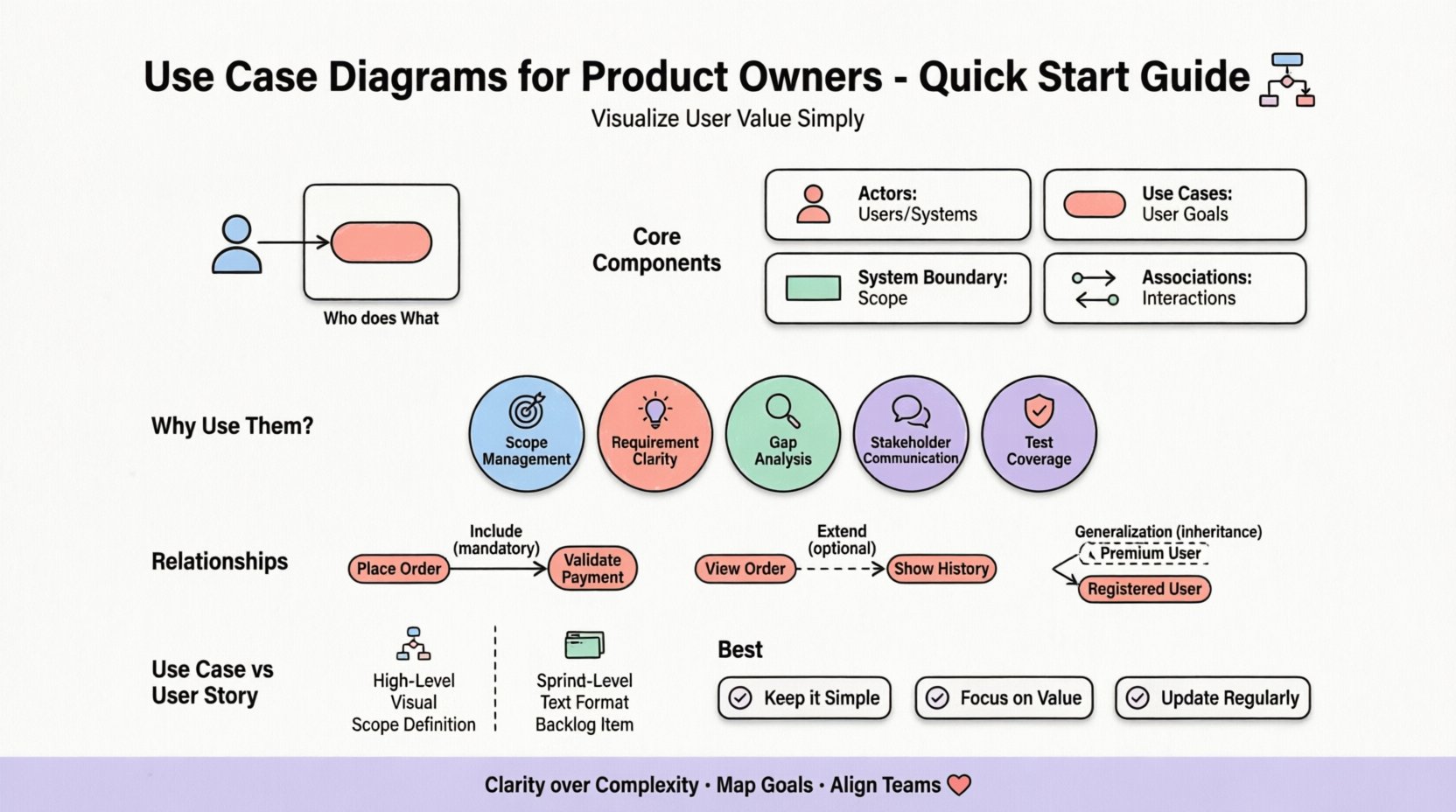
A Use Case Diagram is a visual representation of the functional requirements of a system. It maps out the interactions between external entities (called Actors) and the system itself (represented by Use Cases). Unlike a flowchart, which details the step-by-step logic of a process, a Use Case Diagram focuses on who does what within the context of the system.
For Product Owners, this distinction is critical. It shifts the focus from implementation details to user goals. By defining the boundaries of the system, you create a shared understanding of what is included in a release and what remains outside the scope.
To build a meaningful diagram, you must understand the fundamental building blocks. These components remain consistent regardless of the tool used to create them.
While developers might create detailed sequence diagrams or class diagrams, a Product Owner benefits from the high-level abstraction of a Use Case Diagram. Here is why this specific visualization supports your role:
Creating a diagram does not require advanced technical skills. It requires a structured approach to gathering information. Follow these steps to build a foundational diagram for your product.
Start by listing everyone who interacts with your product. Avoid technical roles (like “Database”) unless the database is an external system triggering actions. Focus on human roles and external systems.
Draw a box. Ask yourself: “What is the core functionality we are building right now?” Anything outside this box is either a dependency or out of scope. Be strict here. If a feature is planned for a future phase, place it outside the box or in a separate diagram.
For each actor, list the goals they want to achieve. Use verb-noun phrases for clarity.
Connect actors to their corresponding use cases using straight lines. If a use case is shared by multiple actors, ensure the lines reflect that correctly.
Not all use cases exist in isolation. They often relate to one another. Understanding these relationships prevents redundancy and clarifies logic.
This means one use case must perform another use case to complete its function. It is a mandatory dependency.
This means one use case adds optional behavior to another under specific conditions. It is not always executed.
This is used when a specific actor or use case is a specialized version of a general one.
| Relationship Type | Symbol | Meaning | Example |
|---|---|---|---|
| Association | Solid Line | Actor interacts with Use Case | Admin creates Report |
| Include | Dashed Arrow <<include>> | Mandatory step within another | Login requires Validate Credentials |
| Extend | Dashed Arrow <<extend>> | Optional step under condition | Apply Discount extends Checkout |
| Generalization | Solid Triangle Arrow | Specialization of Actor/Use Case | Guest User is a type of Visitor |
Product Owners often confuse Use Cases with User Stories. While both describe functionality, they serve different purposes in the lifecycle.
| Feature | Use Case | User Story |
|---|---|---|
| Focus | System Functionality & Goals | User Value & Acceptance |
| Level | High-Level / Macro | Low-Level / Micro |
| Output | Diagram | Backlog Item |
| Best Used | Defining Scope & Architecture | Planning & Sprint Execution |
To ensure these diagrams remain useful and not just decorative artifacts, adhere to these guidelines.
Even experienced Product Owners can make mistakes when modeling interactions. Watch out for these common errors.
In an Agile environment, documentation must be lightweight but effective. Here is how a Use Case Diagram fits into the sprint cycle.
During the initial discovery, create a “Vision Level” diagram. This captures the major goals of the product. It helps align stakeholders before any code is written.
Before a backlog item enters the sprint, ensure it maps back to a Use Case. This ensures the story contributes to a defined user goal. If a story has no parent Use Case, it might be an orphan requirement.
Use the diagram to explain context to the development team. If a feature involves a complex interaction, refer to the diagram to explain the boundaries. It reduces ambiguity during the estimation session.
If scope creep occurs, refer back to the diagram. It provides objective evidence of what was originally scoped. This helps in negotiating changes with stakeholders.
How do you know if using Use Case Diagrams is working for your team? Look for these indicators.
The ultimate goal of a Product Owner is to maximize user value. Use Case Diagrams are a direct tool for this analysis. When you map a Use Case, you are essentially mapping a value proposition.
For every use case you add, ask:
Consider the “Cancel Subscription” example again. If you find this use case exists but is hard to find in the UI, the diagram highlights a disconnect between the system’s capability and the user experience. This insight drives UX improvements.
As your product grows, the diagram will grow. Managing this growth is essential.
Visualizing user value is not just about drawing boxes and lines. It is about thinking clearly about the relationship between the user and the system. For a Product Owner, a Use Case Diagram serves as a strategic tool that bridges the gap between business intent and technical execution.
By mastering the basics of actors, use cases, and relationships, you equip yourself with a language that clarifies scope, manages expectations, and ensures that the team builds the right things. Start small, keep it simple, and let the diagram evolve as your product matures.
Remember, the goal is clarity, not complexity. Use these diagrams to illuminate the path for your team and your stakeholders, ensuring that every line of code contributes to a defined user goal.
Adopting this approach ensures that your product vision remains grounded in user reality, driving consistent value delivery across all sprints and releases.