Visual Paradigm Desktop |
  Visual Paradigm Online


Every Agile team starts with the intention of a smooth, energetic daily stand-up. This ritual is designed to synchronize the team, identify blockers, and align on the day’s work. However, experience shows that meetings often drift into inefficiency. When the stand-up loses its rhythm, it becomes a time sink rather than a value driver. This guide provides a structured approach to diagnosing and resolving common Agile stand-up failures. We focus on practical adjustments without relying on specific tools or platforms.
When a daily stand-up becomes problematic, it is rarely a sudden event. It is usually the result of accumulated friction. The ceremony itself is not the issue; the execution and adherence to the underlying principles are where the breakdown occurs. Teams often mistake status reporting for progress tracking. This shift changes the dynamic from collaboration to performance review, which reduces psychological safety.
Successful troubleshooting begins with honest observation. You must identify if the issue lies in the content of the conversation, the facilitation style, or the environment. Below is a breakdown of the core symptoms that indicate a stand-up is underperforming.
Not every delay is a failure. Some friction is normal. However, consistent patterns suggest a systemic issue. Use the table below to map observed symptoms to potential root causes.
Symptom Observed | Impact on Team | Probable Root Cause |
|---|---|---|
Meeting runs over 15 minutes | Development time is lost | Deep-dive problem solving occurs publicly |
Team members remain silent | False sense of alignment | Low psychological safety or lack of preparation |
One person dominates the talk | Others disengage or check out | Unclear facilitation or lack of structure |
Updates are repetitive | Information redundancy | Focus on output rather than outcome |
Blockers are not raised | Work stops unexpectedly | Blame culture or fear of asking for help |
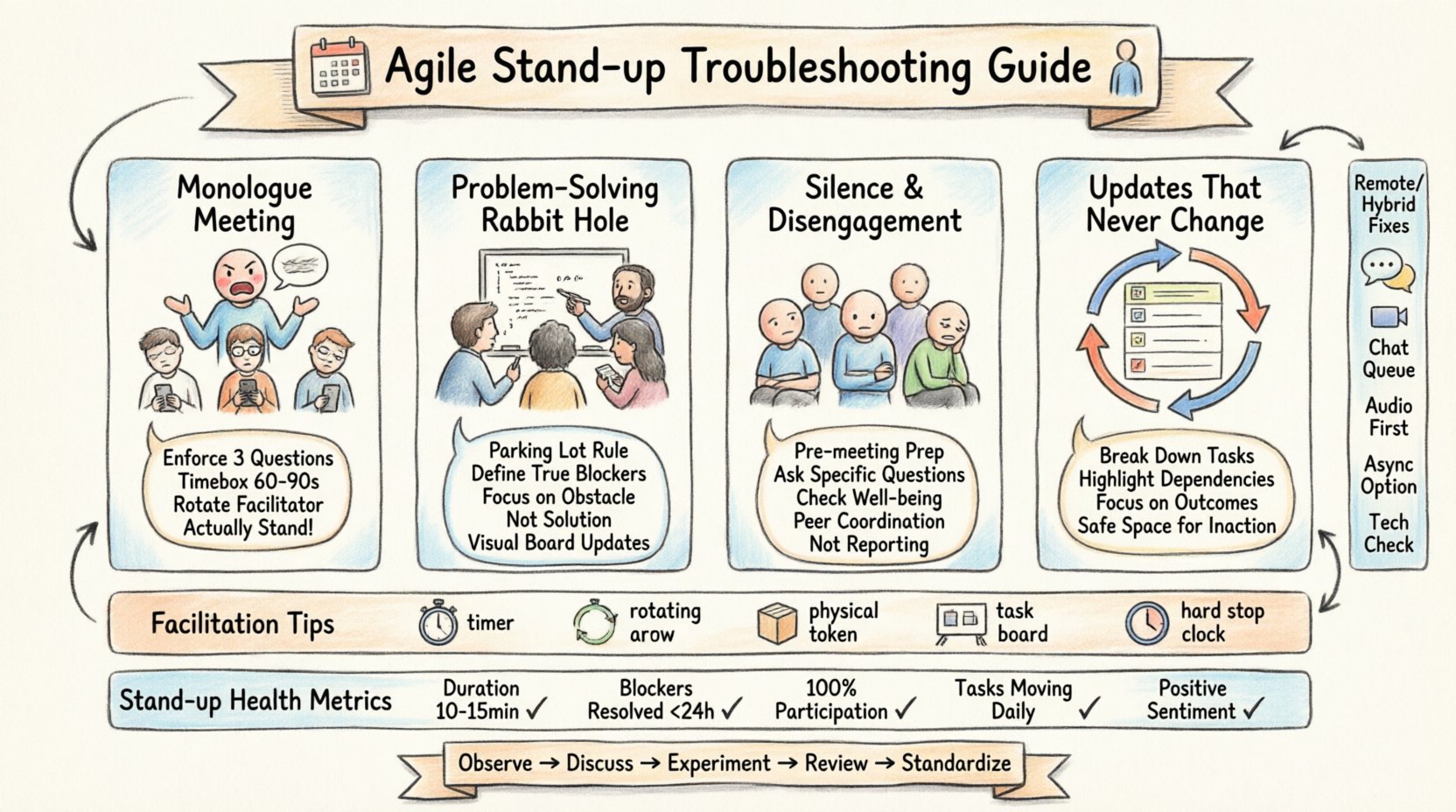
One of the most frequent issues is the transformation of the stand-up into a monologue. Instead of a dialogue, one individual, often the Scrum Master or Team Lead, talks for the majority of the time. This happens when team members feel responsible for summarizing their own work without speaking, or when the facilitator feels the need to control the narrative.
Why this happens:
Participants are waiting for the next person to speak rather than listening.
There is no clear expectation on what a valid update looks like.
The facilitator has not established a round-robin structure.
Actionable Fixes:
Enforce the Three Questions: Remind the team of the standard format: What did you do yesterday? What will you do today? Are there any blockers? This limits the scope of the update.
Timebox Individual Turns: Allocate a specific time, such as 60 to 90 seconds, per person. Use a visible timer.
Rotate Facilitation: Allow different team members to run the meeting. This shifts the ownership of the ceremony and prevents one voice from dominating.
Stand Up: Physically stand during the meeting. This simple constraint naturally reduces the time people are willing to spend talking.
Another common failure mode is the immediate solution of problems during the daily stand-up. A team member mentions a blocker, and two others immediately start discussing the technical solution. The meeting extends, and the original purpose of synchronization is lost.
Why this happens:
Urgency overrides process.
There is no designated time for technical discussions.
Team members are eager to help but lack the structure to do so efficiently.
Actionable Fixes:
The Parking Lot: Establish a rule that any discussion longer than two minutes moves to a “Parking Lot” item. Schedule a separate follow-up session immediately after the stand-up.
Blocker Definition: Clarify what constitutes a true blocker versus a minor impediment. Minor issues should be handled asynchronously via chat or email.
Focus on the Blocker, Not the Fix: Encourage the speaker to state the obstacle clearly without inviting a solution. Let the team note the issue and decide later if it needs immediate attention.
Visual Management: Ensure blockers are visible on the board. This allows the team to see the issue without needing to verbalize the details during the sync.
Silence is often the biggest red flag. If team members are not speaking, or if they are giving minimal updates like “working on it,” the team is not truly synchronized. This often indicates that the daily stand-up is not perceived as valuable by the participants.
Why this happens:
Team members feel the meeting is a waste of time.
There is a lack of preparation before the meeting.
Psychological safety is low, making people afraid to admit they are stuck.
Actionable Fixes:
Pre-meeting Prep: Encourage team members to update their task boards before the meeting starts. If the board is up to date, the spoken update adds value.
Ask Specific Questions: Instead of “What are you working on?”, try “What is the most important thing you completed yesterday?” Specificity prompts better answers.
Check-in on Well-being: Occasionally ask how the team is feeling. If morale is low, a daily status update feels like pressure.
Remove the “Reporter” Mindset: Reinforce that this is not a report to management. It is a coordination mechanism for peers.
When a team member reports the exact same status for days without movement, the stand-up loses its purpose. This stagnation suggests that work is blocked, priorities are unclear, or the work is too granular.
Why this happens:
Tasks are not broken down correctly.
The team is waiting on external dependencies.
There is a lack of commitment to the sprint goal.
Actionable Fixes:
Review Task Granularity: Ensure work items are small enough to be completed in a day or two. Large tasks obscure progress.
Inspect External Dependencies: If a team is waiting on an external party, make that clear. The stand-up should highlight these risks, not hide them.
Shift Focus to Outcomes: Ask “What value did you deliver yesterday?” rather than “What task did you finish?” This shifts the focus to tangible results.
Admit Inaction: Create a safe space to say “I did not make progress.” This allows the team to address the root cause rather than pretending progress is happening.
Facilitation is the engine of a successful stand-up. Even with the best intentions, a lack of structure leads to chaos. Adjusting how the meeting is run can often resolve multiple symptoms at once.
Keep it Timeboxed: 15 minutes is the standard. If the team is large, consider 2 minutes per person. Use a timer that is visible to everyone.
Move the Location: If possible, move the stand-up to the team’s workspace or a dedicated area. Change the environment to signal a change in activity.
Use a Physical Object: Pass a physical object to the speaker. This prevents interruptions and ensures only one person speaks at a time.
Review the Board: Always start by looking at the task board. Visual cues help ground the conversation in reality rather than memory.
End on Time: If the timer goes off, the meeting ends. Do not let the last person finish if time is up. This builds discipline.
Modern teams often operate in hybrid or remote environments. These setups introduce unique challenges that can degrade the quality of the stand-up. Audio lag, camera fatigue, and lack of non-verbal cues can disrupt the rhythm.
Audio Clipping: People talk over each other due to latency.
Camera Fatigue: Keeping cameras on for 15 minutes is draining.
Side Conversations: Participants chat in the main channel while the meeting happens.
Distraction: It is easier to multitask when not in the same room.
Turn Off Cameras: Allow participants to turn off cameras if bandwidth is an issue or fatigue is high. Focus on audio quality.
Use a Chat Queue: Use the chat function to queue speakers. This prevents the “talking over each other” problem.
Video Stand-up: If possible, use a video call where everyone is visible to simulate the physical presence, even if cameras are off.
Asynchronous Stand-up: For distributed teams across many time zones, consider moving to an asynchronous text update. This is not a replacement for all stand-ups, but can be used for specific days.
Check Tech Early: Ensure audio and video are working before the meeting starts. Technical glitches waste valuable time.
How do you know if the troubleshooting is working? You need metrics that reflect the quality of the meeting, not just the attendance. Track these indicators over a sprint to see trends.
Metric | Healthy Range | Warning Sign |
|---|---|---|
Meeting Duration | 10-15 minutes | Consistently over 20 minutes |
Blocker Resolution Time | Resolved within 24 hours | Blockers remain open for days |
Participation Rate | 100% of team members speak | Same 2 people dominate |
Task Completion | Tasks move to “Done” daily | Tasks stay in “In Progress” for weeks |
Team Sentiment | Positive or Neutral | Complaints about the meeting frequency |
Improving the daily stand-up is an iterative process. It requires the willingness of the team to admit when things are not working and the courage to try new approaches. Start by selecting one symptom from the troubleshooting guide. Pick one fix and implement it for the next sprint. Evaluate the results. If it helps, keep it. If not, try another.
Remember that the goal of the stand-up is not to report work. It is to create a shared understanding of the team’s progress and challenges. When the meeting serves this purpose, the team gains momentum. When it does not, it drains energy. By applying these troubleshooting steps, you can restore the stand-up as a vital engine for your Agile workflow.
Observe: Watch the next three meetings and note where time is lost.
Discuss: Bring the findings to the retrospective.
Experiment: Try one structural change (e.g., timeboxing, rotating facilitator).
Review: Check if the change reduced friction or improved clarity.
Standardize: If the change works, make it a permanent team norm.
Agile is about adaptation. The stand-up is the most frequent adaptation point in the sprint. Treat it with the same scrutiny as your code or your product. By maintaining a critical eye on the process, you ensure that the team remains focused, aligned, and effective.