Visual Paradigm Desktop |
  Visual Paradigm Online


Ever wish you could quickly get a clear picture of how users interact with a system? Especially for something as complex as an inventory management system? Manually drawing diagrams can take ages, but what if an AI could do the heavy lifting for you? This is where an AI-powered modeling software truly shines, transforming how we approach system analysis and design.
Imagine Sarah, a project manager tasked with overhauling her company’s existing inventory system. She needs to explain the system’s intended behavior to developers, stakeholders, and new team members. A Use Case Diagram is perfect for this! It shows the different types of users (actors) and the various functions (use cases) they perform within the system. It’s a fantastic way to capture requirements and ensure everyone is on the same page.
However, drawing these diagrams from scratch can be time-consuming. Sarah’s objective is clear: she needs a professional, accurate Use Case Diagram, and she needs it fast, without getting bogged down in drawing details. This is where a modern AI Use Case Diagram generator becomes her best friend.
With Visual Paradigm’s AI-powered modeling software, Sarah doesn’t need to be a UML expert or spend hours dragging and dropping shapes. She simply describes what she needs. Her interaction with the AI chatbot was incredibly straightforward:
Sarah’s Prompt:
“Generate a use case diagram for an inventory system”
That’s it! In moments, the AI diagram tool processed her request and presented a comprehensive Use Case Diagram. The simplicity of this interaction highlights the efficiency of using an AI Chatbot for diagrams. It lets you focus on your system’s logic, not the drawing process.
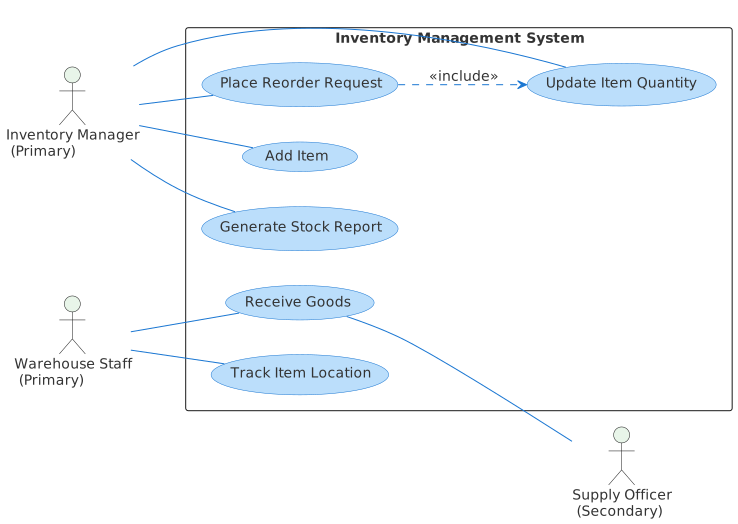
Let’s unpack the diagram the AI created for Sarah. It provides a clear blueprint of an inventory management system, illustrating key interactions:
Actors (Who interacts with the system?):
Use Cases (What can the system do?):
<<include>> relationship here, meaning that placing a reorder request inherently involves updating item quantities.This diagram, generated with a simple text prompt, immediately gives Sarah a professional, detailed overview of the Inventory System Use Case. It clearly defines roles and responsibilities, making future development discussions much smoother.
Choosing an advanced UML Use Case Diagram software like Visual Paradigm’s AI-powered solution means you spend less time on manual diagramming and more time on crucial design decisions. It’s about empowering you to quickly visualize complex systems, iterate on ideas, and communicate them effectively. You get the benefits of an expert’s output without needing to become the expert drafter yourself.
Ready to map out your system’s interactions? Give our AI-powered modeling software a try at Visual Paradigm’s AI Chatbot today!
A Use Case Diagram is a behavioral diagram in the Unified Modeling Language (UML) that shows the relationships among actors (users) and use cases (functions or services provided by a system). It helps to describe the functional requirements of a system in an easy-to-understand way.
AI-powered modeling software analyzes your natural language input, understands the entities and actions described, and then intelligently constructs a standard Use Case Diagram. It identifies potential actors, their roles, and the core functionalities they would perform within the specified system (e.g., an inventory system).
Yes, typically after an AI-powered modeling software generates a diagram, you can refine it. While the AI provides a strong starting point, you can usually edit or add details to better fit your specific project’s unique requirements and nuances.
Using an AI tool significantly speeds up the diagramming process, reduces human error, and ensures consistency with UML standards. It allows system analysts and project managers to focus on understanding and validating requirements rather than the mechanics of drawing, making project initiation much more efficient.