 Visual Paradigm Desktop |
  Visual Paradigm Online


Modern engineering systems are becoming increasingly complex. As interconnected networks, autonomous agents, and critical infrastructure grow in sophistication, the margin for error shrinks. Traditional methods of risk assessment often struggle to keep pace with this complexity. This is where the integration of Systems Modeling Language (SysML) with Failure Mode and Effects Analysis (FMEA) offers a robust solution. By combining model-based systems engineering with structured failure analysis, teams can build systems that are not just functional, but resilient.
This guide explores the mechanics of embedding failure analysis directly into the SysML model. It moves beyond simple documentation to create a living, traceable representation of system risk. We will examine how to structure data, link requirements to failure modes, and utilize specific SysML diagrams to enhance safety and reliability without relying on specific commercial tools.
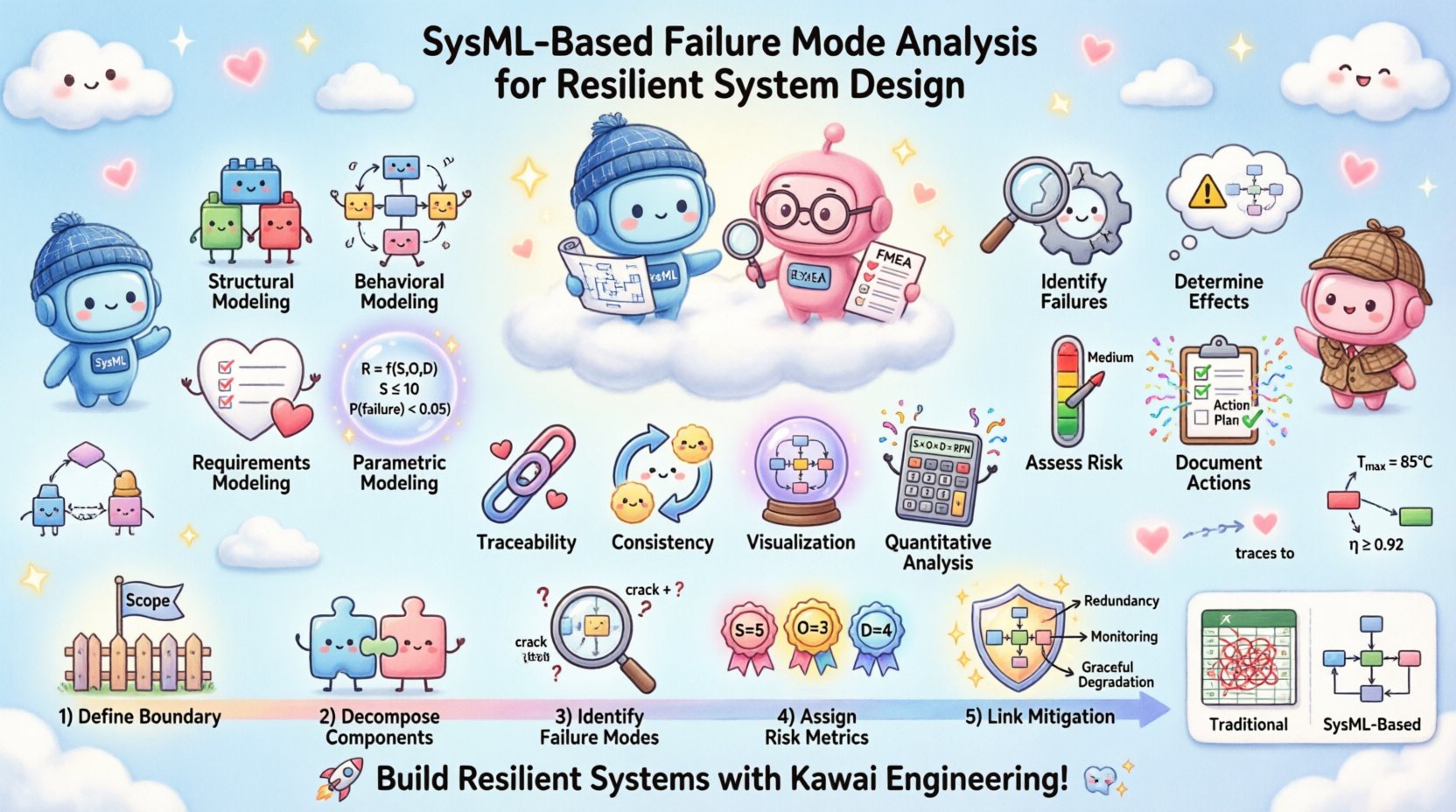
To effectively implement this approach, one must first understand the distinct roles of the two methodologies involved. SysML provides the structural and behavioral framework for defining the system. FMEA provides the analytical framework for identifying potential points of failure.
SysML is a general-purpose modeling language for systems engineering applications. It is a profile of the Unified Modeling Language (UML), adapted to handle non-software systems. Key aspects include:
FMEA is a step-by-step approach for identifying all possible failures in a design, a manufacturing or assembly process, or a product or service. The primary goals are to:
When these two are combined, the FMEA data becomes part of the system model itself, rather than a separate spreadsheet. This ensures that risk data evolves with the design.
Integrating failure analysis into the SysML model addresses several pain points found in traditional engineering workflows. The separation of design models from risk analysis documents often leads to version control issues and data silos. Merging them creates a single source of truth.
Key benefits include:
| Feature | Traditional FMEA (Excel/Word) | SysML-Based FMEA |
|---|---|---|
| Data Structure | Flat rows and columns | Object-oriented relationships |
| Traceability | Manual cross-referencing | Automated linkages |
| Impact Analysis | Difficult to assess downstream effects | Visualized via dependency graphs |
| Updates | High risk of human error during changes | Model consistency checks flag discrepancies |
| Collaboration | File sharing and merging conflicts | Centralized repository with version control |
Implementing FMEA within SysML requires extending the standard language with specific concepts. While SysML does not have a built-in “Failure Mode” element by default, it supports extensibility through stereotypes and tags. This allows engineers to define custom properties that capture FMEA data.
The BDD is the primary location for defining the system structure. To support FMEA, each block representing a physical component or logical function should be associated with potential failure modes.
<<failureMode<> to represent a specific failure event.Resilience is often a requirement. By linking failure modes to requirements, you ensure that risk mitigation is treated as a design constraint.
For quantitative risk analysis, parametric diagrams are essential. They allow you to define mathematical relationships between failure rates and system availability.
Integrating FMEA into SysML is not merely a documentation task; it is a design activity. The following workflow outlines how to systematically embed failure analysis into the development lifecycle.
Before analyzing failures, you must clearly define what is inside and outside the system. Use the BDD to outline the top-level blocks. This sets the context for where failures can originate and where they can propagate.
Break down the top-level blocks into sub-systems and components. Each level of decomposition should be analyzed for failure modes. This hierarchical approach ensures that no component is overlooked.
For each component, list possible ways it can fail. This includes:
Assign qualitative or quantitative values to each failure mode. Standard metrics include:
Every high-risk failure mode needs a mitigation strategy. In SysML, this can be modeled as a requirement or a design change. If a failure mode has a high severity, a new safety block or redundant path should be added to the model.
One of the most significant advantages of SysML is its ability to maintain traceability. When a design changes, you need to know how that change affects the risk profile of the system.
Trace failure modes back to the requirements that mandate their mitigation. This ensures that safety requirements are not just written, but actively addressed in the design.
Trace failure modes forward to the system effects. If a sensor fails, does the control system fail? Does the entire vehicle become unsafe? By modeling these dependencies, you can calculate the criticality of individual components.
| Change Type | SysML Impact | FMEA Action |
|---|---|---|
| Component Removal | Update BDD structure | Re-evaluate redundancy and failure modes |
| Parameter Change | Update Parametric Diagram | Recalculate reliability metrics |
| New Requirement | Add Requirement Node | Identify new failure modes to satisfy it |
| Interface Modification | Update IBD flows | Analyze signal loss or corruption risks |
To ensure the model remains useful and accurate, adhere to the following best practices.
Even with a robust framework, challenges arise. Understanding these helps in navigating the implementation process.
Adding FMEA data to every block can make the model very heavy. Focus on critical components rather than every single screw or connector unless the failure of that specific part is critical to safety.
Ensure the FMEA data is accessible to the safety team, the design team, and the project managers. If the data is hidden in a specific diagram, it may be ignored.
Do not model every theoretical failure. Focus on probable and critical failures. If the probability is negligible, document it as such, but do not clutter the model with low-priority items.
Models degrade over time. Without strict governance, the link between the model and the actual FMEA report will break. Regular synchronization is mandatory.
The integration of SysML and FMEA is evolving. As systems become more autonomous, the nature of failure changes.
Yes. While SysML is often associated with hardware, it is a general-purpose language. Software components can be modeled as blocks, and logic failures can be analyzed using the same principles.
Use the Parametric Diagrams in SysML. These allow you to define equations and constraints that support quantitative calculations even if the surrounding diagrams are qualitative.
Yes. While it requires discipline, it scales. Small teams can focus on critical paths and high-risk components, applying the method selectively to maximize benefit without overhead.
Document it as a “Unknown Failure Mode” or “Residual Risk.” Assign a placeholder risk rating and flag it for further testing or analysis. This ensures it is tracked until resolved.
FMEA is bottom-up (component to system), while FTA is top-down (system to component). SysML can support both. You can use FMEA for component reliability and FTA for system-level logic failures, linking them within the same model.
No. SysML is an open standard. You can implement these modeling techniques using any compliant modeling environment. The value lies in the methodology, not the software.
Building resilient systems requires a proactive approach to risk. By embedding Failure Mode and Effects Analysis directly into SysML models, engineering teams can achieve higher levels of traceability, consistency, and safety. This approach moves risk management from a passive documentation exercise to an active design driver.
While the initial setup requires effort and discipline, the long-term benefits in reduced rework, improved safety, and clearer communication are substantial. As systems grow in complexity, the ability to model risk alongside function will become a standard requirement for successful engineering projects.
Start by defining your blocks, attach your failure modes, and link your requirements. Let the model drive the safety analysis, rather than the other way around.