 Visual Paradigm Desktop |
  Visual Paradigm Online


Information Systems courses frequently require teams to deliver complex software solutions within a fixed semester timeline. This environment mirrors real-world development constraints while introducing unique academic pressures. Selecting the appropriate project management framework is critical for student success. Two dominant methodologies dominate the industry: Scrum and Kanban. Both fall under the Agile umbrella, yet they operate on distinct principles regarding flow, timing, and roles.
Understanding the differences between these approaches allows teams to align their workflow with course requirements and team capabilities. This guide provides a deep dive into both frameworks, comparing their mechanics and applying them specifically to the academic context of Information Systems projects.
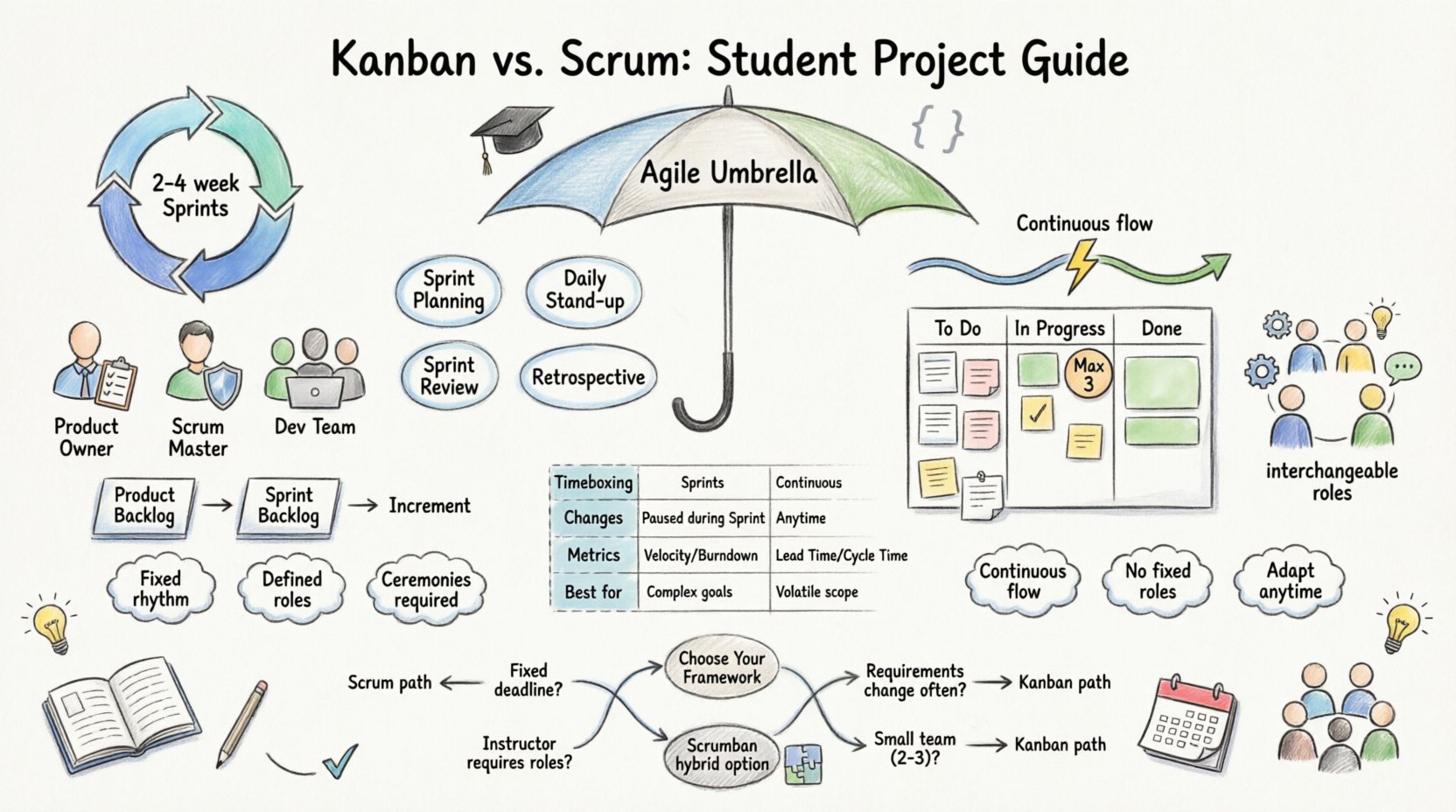
Agile methodologies prioritize iterative progress, customer feedback, and adaptability over rigid planning. In a university setting, the “customer” is often the instructor or a simulated client, and the timeline is the academic calendar. Traditional Waterfall models often fail here because requirements change as students learn more about the domain. Agile frameworks accommodate this fluidity.
However, not all Agile methods are identical. Scrum imposes a strict rhythm, while Kanban emphasizes continuous flow. Choosing the right one depends on the nature of the deliverables, the stability of the requirements, and the team’s experience level.
Scrum is a structured framework that organizes work into fixed-length iterations called Sprints. Typically, a Sprint lasts two to four weeks. This time-boxing creates a predictable cadence for planning, execution, and review. For Information Systems students, this structure can provide necessary discipline.
Scrum defines three specific roles that govern the project lifecycle. Each student must understand their responsibilities to avoid friction.
Scrum relies on specific ceremonies to maintain momentum. These events provide structure to the chaotic nature of student schedules.
Scrum utilizes specific documents to track work. The Product Backlog lists all desired features. The Sprint Backlog contains the specific tasks chosen for the current iteration. The Increment is the sum of all completed backlog items at the end of a Sprint.
Kanban focuses on visualizing work and managing flow. Unlike Scrum, it does not enforce fixed timeboxes or specific roles. The goal is to optimize the movement of tasks from “to do” to “done” without bottlenecks.
The core of Kanban is the board. Columns typically represent stages of the workflow, such as “To Do,” “In Progress,” and “Done.” Cards represent individual tasks. Moving a card from left to right provides a clear visual status of the project.
One of the most powerful features of Kanban is the WIP limit. This restricts the number of tasks allowed in a specific column at one time. For example, a team might limit “In Progress” to three items. This forces the team to finish work before starting new work, reducing context switching.
Kanban supports continuous delivery. As soon as a task is finished, it can be deployed or moved to the next stage. There is no need to wait for a Sprint to end. This is beneficial when projects have flexible deadlines or when features can be released incrementally.
Kanban does not mandate specific titles like Product Owner or Scrum Master. The team self-organizes based on the workload. Roles may emerge naturally, such as someone handling the board or someone reviewing code, but they are not formal requirements.
Comparing these frameworks helps clarify which fits a specific Information Systems project. The following table outlines the structural differences.
| Feature | Scrum | Kanban |
|---|---|---|
| Timeboxing | Fixed Sprints (2-4 weeks) | Continuous Flow |
| Roles | Product Owner, Scrum Master, Team | No Prescribed Roles |
| Changes | Changes paused during Sprint | Changes allowed anytime |
| Metrics | Sprint Velocity, Burndown | Lead Time, Cycle Time |
| Meetings | Planned Ceremonies | Optional, as needed |
| Best For | Complex, well-defined goals | High volatility, support work |
The decision between Scrum and Kanban should not be arbitrary. It depends on the syllabus, the project scope, and the team’s maturity.
Scrum is often the default choice for Information Systems courses. The reasons are structural.
Kanban suits projects where flexibility is paramount.
Academic teams often face unique challenges. Students have varying schedules, other course commitments, and different skill levels. The framework chosen impacts how these dynamics play out.
Scrum enforces communication through mandatory meetings. This can be a burden for busy students but ensures everyone is aligned. Kanban relies on visual management. If the board is updated, communication is implicit. This reduces meeting fatigue but requires discipline.
Disagreements on technical approach or feature priority are common. In Scrum, the Product Owner has the final say on priority. In Kanban, the team must reach a consensus. Scrum provides a clearer hierarchy, which can reduce argument time. Kanban fosters a more democratic environment, which can lead to better buy-in but slower decisions.
Information Systems projects often involve diverse skills like database design, frontend development, and testing. Scrum allows the team to assign roles based on strength (e.g., the database expert owns the data column). Kanban allows individuals to pull tasks as they become available, accommodating fluctuating availability.
Even with the right framework, student teams often stumble. Awareness of these pitfalls helps avoid them.
In Scrum, teams sometimes aim to complete every single item in the Sprint Backlog. This leads to stress and burnout. It is better to deliver a working subset of features than to rush and fail. Accepting incomplete work is part of Agile.
In Kanban, tasks often pile up in the “Testing” or “Review” column. This indicates a bottleneck. Teams must address this by either helping with testing or limiting work in the previous column. Ignoring this leads to a backlog of unfinished code.
Students often focus on code and ignore documentation. Agile does not mean “no documentation.” Information Systems projects require design docs, API specs, and user guides. Ensure the framework includes time for this.
In Scrum, if no one claims the Product Owner role, requirements stall. In Kanban, if no one manages the board, the visual system fails. Assign responsibilities explicitly at the start.
Academic projects must meet specific grading criteria. The framework should support the assessment, not hinder it.
Instructors often require progress reports. Scrum generates these naturally through Sprint Reviews and Burndown charts. Kanban requires manual tracking of Cycle Time and throughput. Be prepared to generate these reports even if they are not part of the daily workflow.
Check the syllabus. Does the class expect a demo every two weeks? Scrum fits perfectly. Does the class expect a final defense? Kanban allows you to focus on the final polish until the end, though this risks technical debt.
Some courses require a backlog or a task list. Both frameworks produce these artifacts. Ensure you maintain a record of decisions made during planning or retrospective meetings. These serve as evidence of the process.
Strict adherence to one framework is not always necessary. Many teams adopt a hybrid approach known as Scrumban.
This approach offers the structure of Scrum with the flexibility of Kanban. It is particularly useful when project requirements are stable enough to plan but volatile enough to require daily adjustments.
Use the following questions to guide your final choice.
The goal is not to follow a rulebook perfectly but to deliver a functional Information System that meets the course objectives. The framework is a tool to facilitate this, not the end goal itself.
Success in an academic project is measured by learning outcomes and product quality. Avoid focusing solely on speed.
By focusing on these metrics, teams can objectively evaluate their performance. This data is valuable for the final project report and personal growth.
The skills learned in these projects extend beyond the classroom. Industry teams use Scrum, Kanban, and hybrids daily. Understanding the trade-offs prepares students for professional environments.
Information Systems professionals must adapt to changing business needs. Agile methodologies provide the toolkit for this adaptation. Whether using Scrum’s discipline or Kanban’s flow, the core value remains the same: delivering value to the user through collaboration and transparency.
Choose the path that fits your team’s current capacity. Re-evaluate as the semester progresses. Flexibility is the true spirit of Agile.