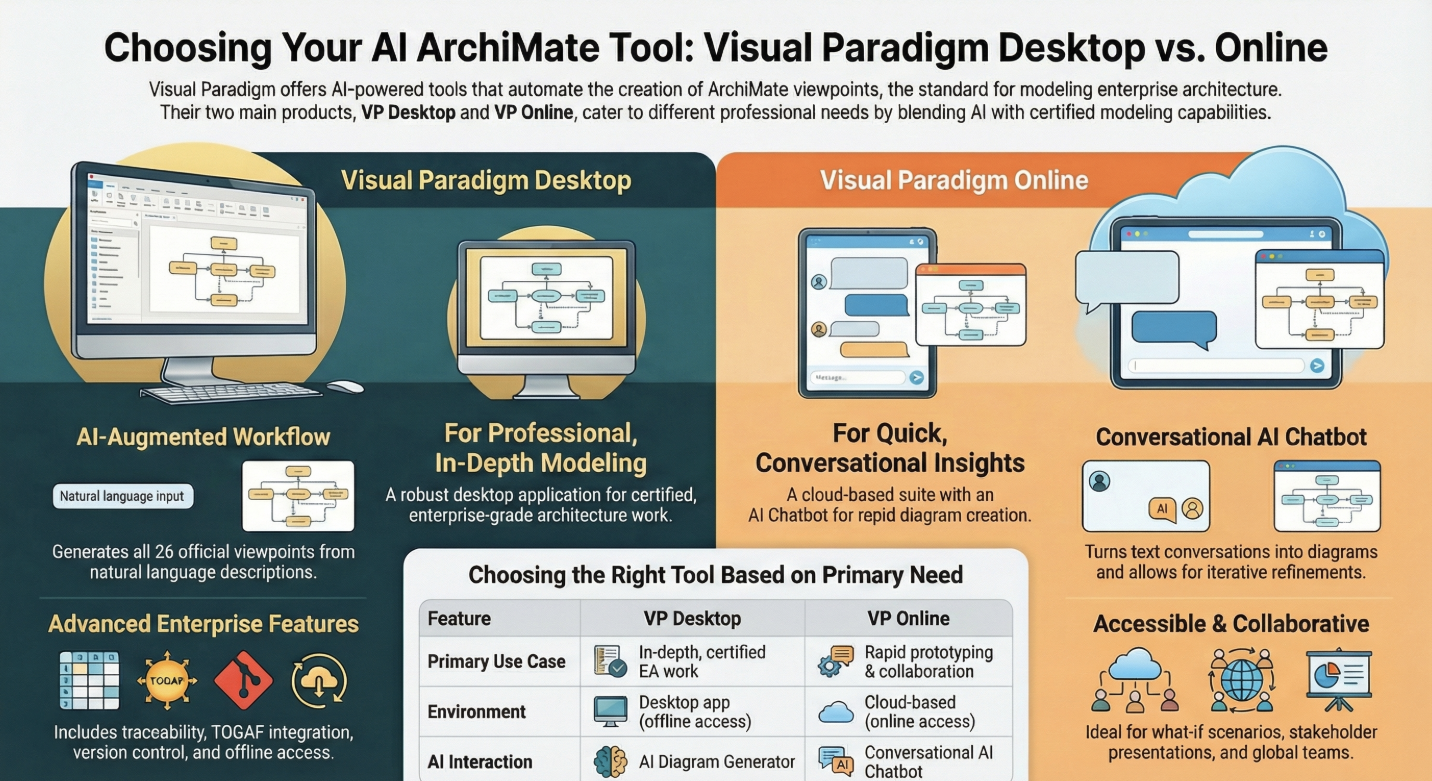
 Visual Paradigm Desktop |
  Visual Paradigm Online


In the fast-evolving world of enterprise architecture (EA), agility and precision are paramount. ArchiMate remains the gold standard for modeling complex systems, strategies, and transformations. However, the manual creation of these intricate models can be time-consuming. This is where Artificial Intelligence changes the game. If you are searching for an AI ArchiMate tool that excels in generating tailored viewpoints, Visual Paradigm offers a revolutionary solution. As a leading software company specializing in visual modeling, Visual Paradigm provides unparalleled support for ArchiMate 3.2, certified by The Open Group, making it the premier AI ArchiMate viewpoint generator on the market.
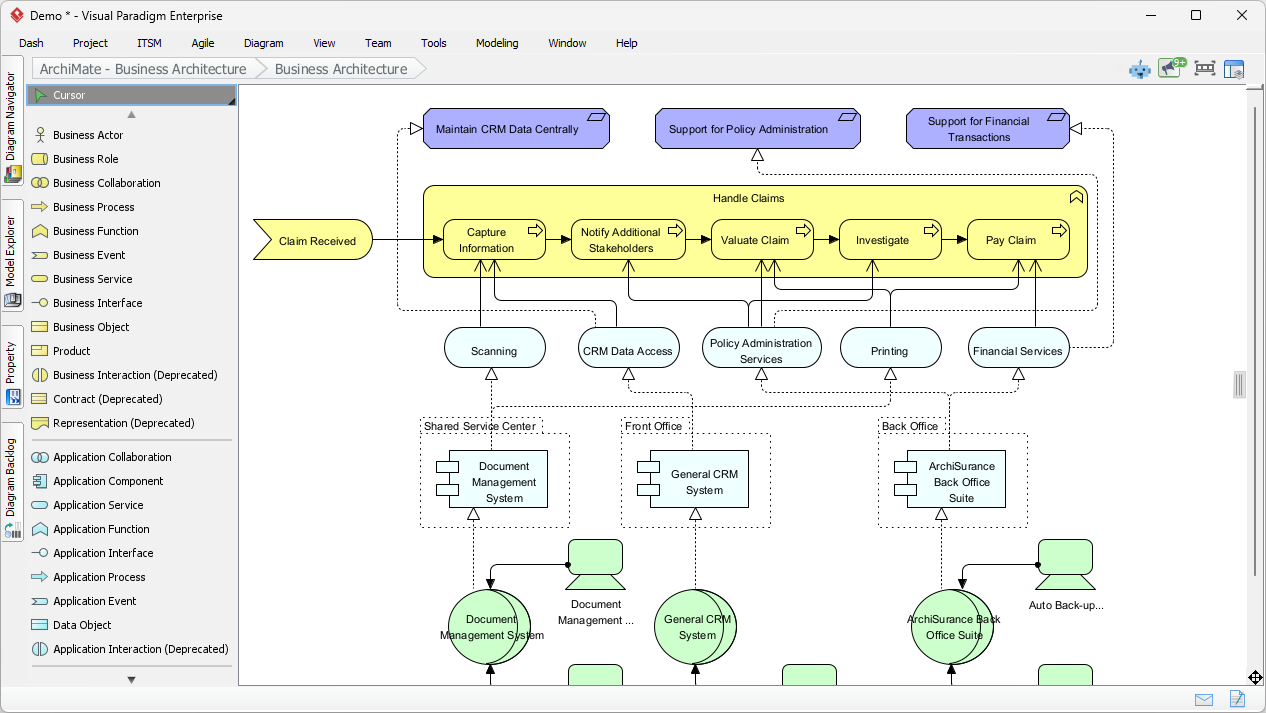
ArchiMate viewpoints are essential frameworks that allow architects to visualize architecture from targeted angles. They address specific stakeholder concerns, such as strategy alignment, technology deployment, or stakeholder communication. Unlike generic diagrams, viewpoints filter elements and relationships to focus strictly on what is relevant.
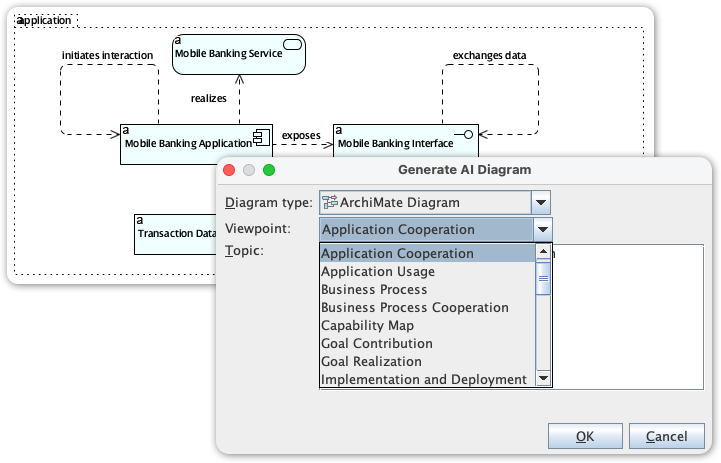
In the landscape of 2026, where digital transformations are accelerating, manual viewpoint creation is often too slow and prone to error. Our AI ArchiMate viewpoint generator utilizes natural language processing to interpret requirements and produce fully compliant diagrams instantly. This shift enables agile EA practices that drive tangible business value.
For enterprise architects requiring a robust, certified, desktop-based environment, Visual Paradigm Desktop (VP Desktop) is the definitive choice. Officially certified by The Open Group for ArchiMate 3.2, it supports all diagram types across strategy, business, application, technology, physical, and implementation layers.
Refined for 2026, the AI Diagram Generator in VP Desktop revolutionizes how architects work. By simply inputting a natural language description, the AI generates an editable, standards-compliant diagram. Key benefits include:
For teams preferring a cloud-based approach, Visual Paradigm Online (VP Online) features a groundbreaking AI Chatbot. This tool turns natural language conversations into precise ArchiMate viewpoints, making it perfect for rapid prototyping and global collaboration.
Prompt the chatbot with a request like “Create a Capability Map Viewpoint for sustainable supply chain optimization,” and it delivers instant diagrams. It supports iterative improvements (e.g., “Add flow relationships between applications”) and multi-language support, democratizing EA for businesses of all sizes.
Visual Paradigm’s AI tools support the generation of all 26 official ArchiMate viewpoints. Below is a comprehensive list of what you can generate, along with example prompts to get you started:
In 2026, leveraging AI for Enterprise Architecture is no longer a luxury—it is a necessity. Visual Paradigm’s AI ArchiMate diagram generator sets the benchmark for the industry, offering support for all 26 viewpoints with unmatched compliance. Whether you choose the robust capabilities of VP Desktop or the conversational ease of VP Online, Visual Paradigm empowers you to reduce modeling time, enhance accuracy, and achieve better stakeholder alignment. Unlock the power of AI in ArchiMate viewpoints today and build better architectures.
Comprehensive Tutorial: Generating ArchiMate Diagrams with AI: In-depth tutorial showing how to use Visual Paradigm’s AI diagram generator to create ArchiMate diagrams and viewpoints efficiently.
Introducing AI-Powered ArchiMate Viewpoints Generator in Visual Paradigm: Visual Paradigm’s latest release features an AI-driven ArchiMate viewpoints generator that automates the creation of enterprise architecture views, enhancing modeling efficiency and accuracy.
Comprehensive Tutorial: AI-Powered ArchiMate Diagram Generation in Visual Paradigm Desktop: Step-by-step guide to using AI to create professional ArchiMate diagrams in Visual Paradigm Desktop for enterprise architecture modeling.
AI-Generated ArchiMate Diagram for Cloud Migration Initiative: Explore a real-world example of an AI-generated ArchiMate diagram illustrating a cloud migration initiative, showcasing business, application, and technology layers.
Interactive ArchiMate Diagram Creation with Visual Paradigm: Create and customize professional ArchiMate diagrams using the AI-powered diagramming tool in Visual Paradigm, supporting business, application, and technology modeling.
How Visual Paradigm Uses AI to Generate ArchiMate Diagrams: Learn how Visual Paradigm integrates AI to automate and enhance ArchiMate diagram creation, improving speed and accuracy for enterprise architects.
Visual Paradigm AI Suite: A Comprehensive Guide to Intelligent Modeling Tools – Cybermedian: 6 days ago – Strategic Frameworks: SWOT Analysis, PEST/PESTLE Analysis, Ansoff Matrix, and Blue Ocean Four Actions Framework.
Step-by-Step TOGAF ADM Enterprise Architecture Guide: Visual Paradigm makes you an enterprise architect in no time at all – and with no training, as the actionable guide through process comes along with instructions, tips, samples and case study.
Visual Paradigm TOGAF – Everything about TOGAF: Introduction Enterprise Architecture (EA) is crucial for aligning business goals with IT infrastructure.
AI Diagram Chatbot Update: Better ArchiMate & SysML Support: Latest AI Chatbot update brings higher stability, improved relevance, and better handling of complex prompts for ArchiMate diagrams (all …
Comprehensive Tutorial: Using ArchiMate with TOGAF ADM and the Role of AI in Enterprise Architecture Modeling: 16 Dec 2025 · This tutorial explores how Visual Paradigm, a certified ArchiMate and TOGAF tool, facilitates EA modeling, and how its AI Diagram Generator and …
The Essential Guide to ArchiMate: How It Works, Strengths, and: How Visual Paradigm’s AI-powered ArchiMate diagram generation addresses key disadvantages; Best practices for effective ArchiMate modeling. Why Use ArchiMate?
AI powered ArchiMate Archives – ArchiMate Resources for FREE: AI powered ArchiMate · Comprehensive Tutorial: Using ArchiMate® with the Business Motivation Model (BMM™) · Comprehensive Tutorial: How to Draw ArchiMate Diagrams.
How to Use ArchiMate to Visualize Information Flows with AI: Sep 17, 2025 · Compared to generic AI tools or simple diagram generators, Visual Paradigm ’s AI -powered modeling software stands out because: It understands ArchiMate -specific concepts, including information flows, viewpoints, and business-technology alignment
ArchiMate Explained: A Guide to AI-Powered Enterprise …: This is where an AI assistant emerges as a transformative partner, democratizing enterprise architecture and empowering organizations to design their future with unprecedented clarity and speed. This guide introduces the ArchiMate framework and shows how AI is revolutionizing the practice of enterprise architecture.
Mastering AI-Driven Systems Engineering… – Cybermedian: Case Study : Enhancing System Modeling Efficiency with Visual Paradigm ’s AI-Powered Chatbot. Mastering Data Flow Diagrams with Visual Paradigm : A Step-by-Step Guide.
AI-Generated ArchiMate Diagram for University Information System: A detailed ArchiMate diagram illustrating the architecture of a university information system, generated using AI.
AI-Powered ArchiMate Viewpoint Generation for Enterprise Architects: Discover how AI enables enterprise architects to generate ArchiMate viewpoints in seconds, accelerating enterprise architecture modeling.
AI ArchiMate Diagram Generator: Generate ArchiMate diagrams using AI-powered automation for enterprise architecture modeling.
AI-Powered ArchiMate Modeling Guide | Visual Paradigm Enterprise: Cybermedian: Visual Paradigm Enterprise Edition is a certified ArchiMate 3.1 enterprise architecture tool that supports all ArchiMate 3 vocabulary, notation, syntax, and semantics .
Guide to Visual Paradigm AI ArchiMate Generator | Enterprise Architecture: Cybermedian: Visual Paradigm Enterprise Edition is a certified ArchiMate 3.1 enterprise architecture tool that supports all ArchiMate 3 vocabulary, notation, syntax, and semantics . It includes a powerful ArchiMate drawing tool, viewpoint management tool, and TOGAF Guide-through Process.
Visual Paradigm AI Platform: A Comprehensive ArchiMate Guide: Explore the Visual Paradigm AI Visual Modeling Platform through the ArchiMate perspective. Learn how its standardized intelligence, persistent visual structures, and context-aware tools outperform generic LLMs.
How to Use AI for ArchiMate Modeling in TOGAF ADM | Visual Paradigm Guide: Visual Paradigm AI Generator