 Visual Paradigm Desktop |
  Visual Paradigm Online


In the complex world of software engineering, visualizing the physical structure of a system is as crucial as understanding its logical design. UML Component Diagrams provide this vital perspective, allowing architects and developers to model the physical aspects of object-oriented systems. They serve as the blueprint for implementation, documenting how individual components map to the larger system and facilitating both forward and reverse engineering.
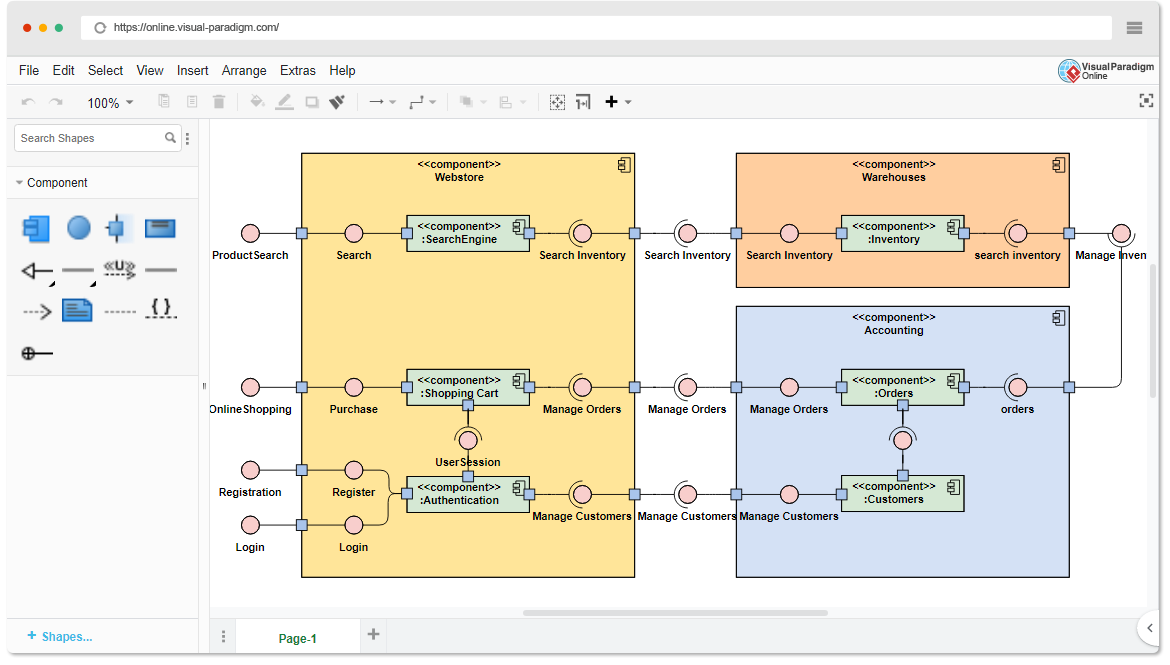
This guide serves as a comprehensive resource for mastering Component Diagrams, covering essential concepts, detailed notations, practical examples, and how modern AI tools can accelerate your modeling process.
While traditional modeling involves manually dragging and dropping shapes, Visual Paradigm AI introduces a layer of automation that significantly enhances productivity and accuracy when working with Component Diagrams.
Before diving into complex architectures, it is essential to understand the foundational elements that make up a Component Diagram. These diagrams focus on a system’s components, which are modular parts that encapsulate their contents.
A component represents a modular part of a system that is replaceable within its environment. In UML 2, it is depicted as a rectangle with the component’s name. It may also include specific compartments for tags or icons. Ideally, a component is a “black box”—its internal workings are hidden, and it interacts with the outside world strictly through interfaces.
Components connect via interfaces, which define a set of operations. Visualizing these is critical for understanding dependencies:
Ports are distinct interaction points, visualized as small squares on the edge of a component. They help organize interfaces, specifying exactly where data enters or leaves the component, effectively decoupling the component’s internal structure from its environment.
A subsystem is a specialized version of a component. It follows the same notation rules but is marked with the keyword <<subsystem>>. Subsystems are often used to group larger functional units of a system.
A Component Diagram is essentially a graph of vertices (components) and arcs (relationships). Understanding the specific notation for these relationships is key to creating accurate models.
An association specifies a semantic relationship between typed instances. It connects components that interact with one another but do not necessarily depend on each other for lifecycle management.
When modeling the hierarchy of components, the distinction between composition and aggregation is vital:
Depicted as a dashed arrow, a dependency signifies that one element (the client) requires another element (the supplier) for its specification or implementation. If the supplier changes, the client may also need to change.
This relationship connects a component to the interface it implements. It essentially says, “This component fulfills the contract defined by this interface.”
Component diagrams are versatile and can be applied to various stages of the software development lifecycle.
Developers can use component diagrams to visualize the organization of source code files.
<<file>>.This view focuses on deployment and runtime structure.
Component diagrams are excellent for bridging the gap between logical object models and physical data storage.
<<table>> to represent physical database tables.Understanding the theory is the first step; putting it into practice is where the value lies. Visual Paradigm Community Edition offers a robust, free platform to create professional UML Component Diagrams. Whether you are learning UML or documenting a complex enterprise system, the tool provides:
By breaking down systems into manageable, high-level functional units, Component Diagrams ensure that every element has a clear aim and interacts efficiently within the ecosystem. Start visualizing your software architecture today to build systems that are easier to understand, maintain, and scale.