 Visual Paradigm Desktop |
  Visual Paradigm Online


The process of organizing complex data hierarchies often presents significant challenges for project managers and developers alike. Utilizing a high-quality online AI tree diagram maker simplifies this task by merging advanced artificial intelligence with intuitive design interfaces. Visual Paradigm Online offers a specialized environment where users can transform high-level concepts into detailed, manageable structures. Whether one is documenting a Fitness Tracker App or a corporate hierarchy, this application provides the tools necessary for precise visualization and data depth. By automating the creation of branches and nodes, the tool allows professionals to focus on strategic decision-making rather than manual formatting.
In the context of modern software development, maintaining a clear overview of requirements is essential for success. The application features a sophisticated dual-view interface that presents a text-based editor alongside a real-time visual diagram. This layout ensures that any changes made to the textual hierarchy are immediately reflected in the visual model. For example, a project lead can define “Epics” and “User Stories” for a mobile application, witnessing the immediate growth of the tree structure. This seamless synchronization fosters a reassuring environment where data integrity is maintained without constant manual adjustments.
The visual representation of a “Fitness Tracker App” requirements set highlights the platform’s ability to handle nested information. By selecting a specific node, such as a user story regarding the starting and stopping of a run, the user gains access to a comprehensive Property Editor. This panel allows for the meticulous adjustment of metadata, including priority levels and implementation status. Such granularity ensures that every individual component of a project is accounted for and professionally documented.
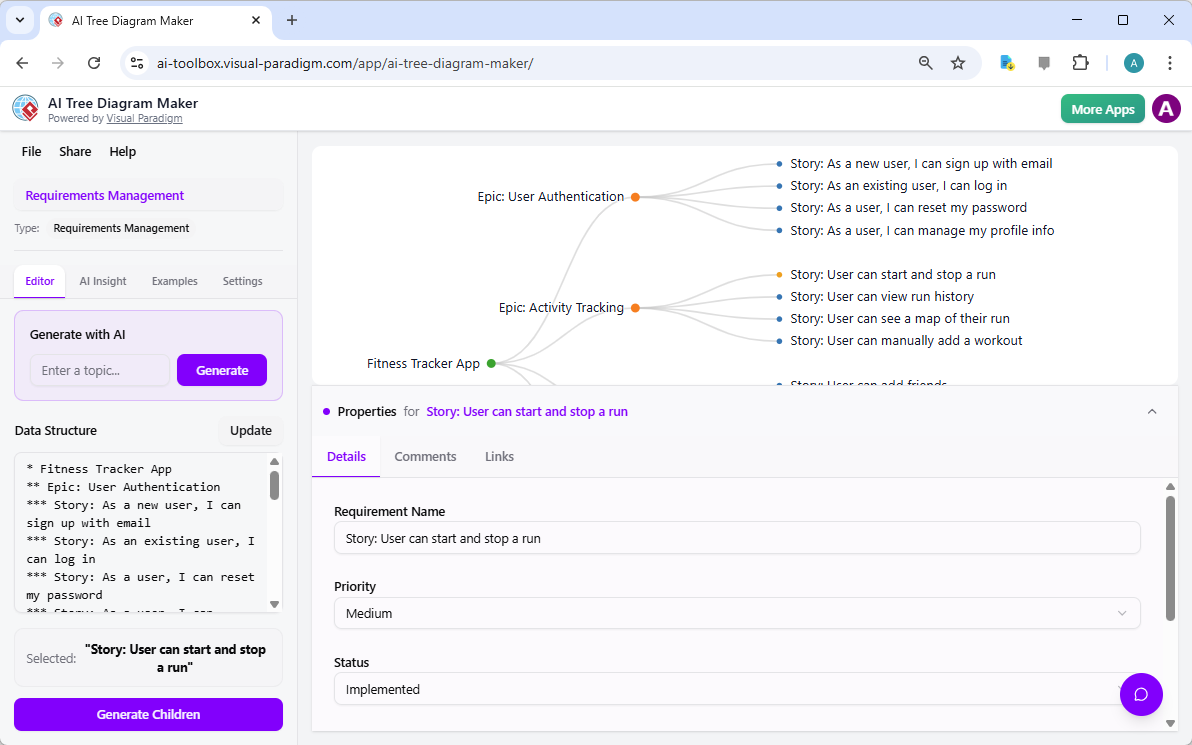
Effortless Synchronization: Experience real-time updates between a simple text-based hierarchy and a professional visual diagram.
AI-Powered Generation: Create comprehensive project structures from a single topic prompt to save valuable planning time.
Granular Data Control: Utilize the Property Editor to assign priority, status, and specific comments to every node in the tree.
Intelligent Chatbot Integration: Query your project data using natural language to receive instant estimations and status summaries.
Structural Consistency: Leverage pre-defined blueprints like Work Breakdown Structures to ensure your data adheres to industry standards.
The foundation of any successful project lies in its structure. The online AI tree diagram maker utilizes a concept known as “Blueprints” to provide users with a structured starting point. These blueprints are specialized templates designed for specific tasks, such as creating a Work Breakdown Structure (WBS) or a Decision Tree. When a user selects a blueprint, the system automatically configures the appropriate node types and properties. This architectural guidance reduces the anxiety associated with starting a complex project from a blank canvas, providing a steady and professional path forward.
Data entry is further simplified through the use of an asterisk-based text format. In this system, the number of asterisks placed before a line of text determines its level within the hierarchy. A single asterisk represents the root or primary goal, while subsequent levels use two or more asterisks to denote sub-tasks or children nodes. This method is highly efficient, allowing for rapid brainstorming sessions where ideas can be captured at the speed of thought. The application then takes these simple text inputs and renders them into a polished, collapsible tree view that is easy for stakeholders to navigate and understand.
The true power of this tool, however, resides in its artificial intelligence capabilities. The “Generate Full Tree” feature allows users to enter a broad topic and receive a complete, logically structured diagram in seconds. This serves as an excellent foundation that can be further refined manually. If a specific branch requires more detail, the “Generate Children” function can be applied to a single node, tasking the AI with expanding that specific area without altering the rest of the diagram. This balanced approach between automated generation and manual refinement provides a highly flexible workflow for various professional needs.
Beyond the initial creation of a diagram, the online AI tree diagram maker offers deep analytical insights. The “AI Insight” tab provides a formal, written evaluation of the project’s structure. By examining the relationships and data within the tree, the AI can identify potential bottlenecks, highlight risks, and suggest improvements. This feature acts as a secondary consultant, offering an objective perspective that can help refine project goals and ensure that no critical dependencies have been overlooked.
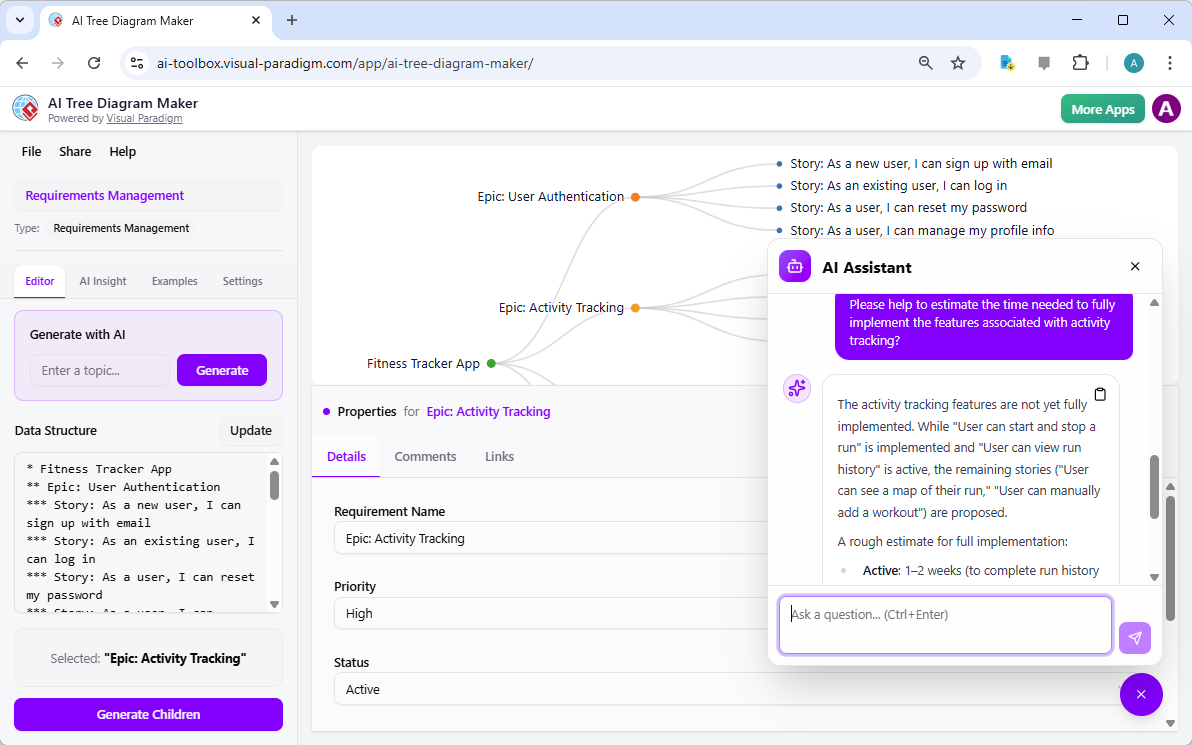
Interaction with the diagram is further enhanced by the presence of a context-aware AI chatbot. This assistant has the capability to “read” the entire tree, including the hidden properties set in the Property Editor. Users can engage in a formal dialogue with their data, asking questions such as “Which tasks are currently pending?” or “What is the overall priority of the development phase?”. This transforms a static visual asset into a dynamic, searchable database that responds to natural language queries with precision and clarity.
In the second visual reference, we observe the AI Assistant providing a formal work plan estimation. By analyzing the “Activity Tracking” epic within the Fitness Tracker project, the chatbot identifies which features are implemented, which are active, and which remain proposed. It then provides a professional time estimate for the remaining work. This capability is invaluable for project managers who must provide accurate reporting to stakeholders without spending hours manually calculating progress from disparate notes.
How does the text editor synchronize with the visual tree?
The interface uses a dual-view system where the text on the left and the diagram on the right are linked. When you type or modify the hierarchy using asterisks, the visual diagram updates instantly. Conversely, selecting a node in the diagram will highlight the corresponding line of text in the editor, ensuring a consistent workflow.
Can the AI Assistant access the specific details I enter for each node?
Yes. The AI Assistant and the AI Insight features are fully context-aware. They have access to the names, descriptions, statuses, and custom properties you have assigned to every node. This allows the AI to provide highly accurate answers based on the specific data contained within your project.
What is the benefit of using a Blueprint?
Blueprints are pre-configured templates that define the structure and the available data fields for your diagram. For example, a Work Breakdown Structure blueprint includes fields for “Status” and “Assignee,” whereas a Decision Tree might focus on “Likelihood” and “Profit.” Choosing the correct blueprint ensures your project has the right metadata from the very beginning.
Maintaining a clear and organized hierarchy is fundamental to the success of any complex endeavor. The online AI tree diagram maker by Visual Paradigm Online provides a comprehensive suite of tools designed to simplify the visualization and analysis of hierarchical data. From the initial generation of ideas using artificial intelligence to the detailed management of node properties and the final analytical review by the AI chatbot, every feature is engineered to provide professional-grade results with minimal stress. By bridging the gap between simple outlines and intelligent data models, this platform empowers users to manage their requirements and project plans with confidence and poise.
As organizations continue to face increasing volumes of information, the need for structured clarity becomes even more paramount. This tool serves as a reliable partner in that journey, ensuring that your data is not only seen but understood and effectively managed. Whether you are a project manager, a business analyst, or a researcher, the integration of AI into your diagramming process will undoubtedly lead to more informed decisions and successful project outcomes.
We invite you to experience the precision and ease of modern diagramming for yourself. You can explore the capabilities of this platform by visiting the AI Tree Diagram Maker information page. To begin creating your own professional project hierarchies immediately, please try the AI Tree Diagram Maker application today. Transform your conceptual outlines into actionable visual intelligence with just a few clicks.
From Text to Diagram: How Tree Diagram Maker Makes Hierarchy Editing Fast and Intuitive: Learn how Visual Paradigm’s Tree Diagram Maker feature enables rapid conversion of hierarchical text into clean, editable tree diagrams for organizational and technical use.
Visualizing Complex Ideas with AI-Powered Tree Diagrams: Explores how AI-driven tree diagram tools help users break down complex concepts into structured, visual representations for better understanding.
Risk Register Template with Tree Diagram Visualization: Use this interactive tree diagram tool to create and manage a risk register, enabling clear visualization of risk hierarchies and mitigation strategies.
AI Tree Diagram Maker | Visualize Hierarchical Data Instantly: Effortlessly create stunning hierarchical diagrams like mind maps, org charts, and work breakdowns with our AI-powered tool. Simply describe your topic and …
AI Tree Diagram Maker – Visual Paradigm AI: Visualize Any Idea. Build Your First Tree Diagram Instantly. Get AI-powered risk analysis and structural suggestions to perfect your project before you even start.
AI Tree Diagram Maker: Generate Hierarchies Instantly – Visual Paradigm Product Updates: Effortlessly create complex tree diagrams from text with Visual Paradigm’s new AI Tree Diagram Maker. Describe your structure, and let AI build the visualization for you.
Home – Tree Diagram Maker: Create, visualize, and analyze hierarchical data with our AI Tree Diagram Maker. Use blueprints for WBS, SWOT, org charts, and more. Start for free.
Comprehensive Tutorial: Mastering the AI Tree Diagram Maker …: Visual Paradigm ’s AI Tree Diagram Maker completely removes that bottleneck by using generative AI to turn natural-language descriptions into fully-structured, professionally formatted tree diagrams in seconds. Instead of drawing, you now think, type, and let AI do the heavy lifting.