Class Diagrams vs. Object Diagrams in UML: A Comprehensive Guide
Unified Modeling Language (UML) provides a powerful framework for visualizing and designing software systems. Among the various types of UML diagrams, class diagrams and object diagrams play essential roles in modeling different aspects of a software system. While they may look similar at a glance, they serve fundamentally different purposes in the software development lifecycle.
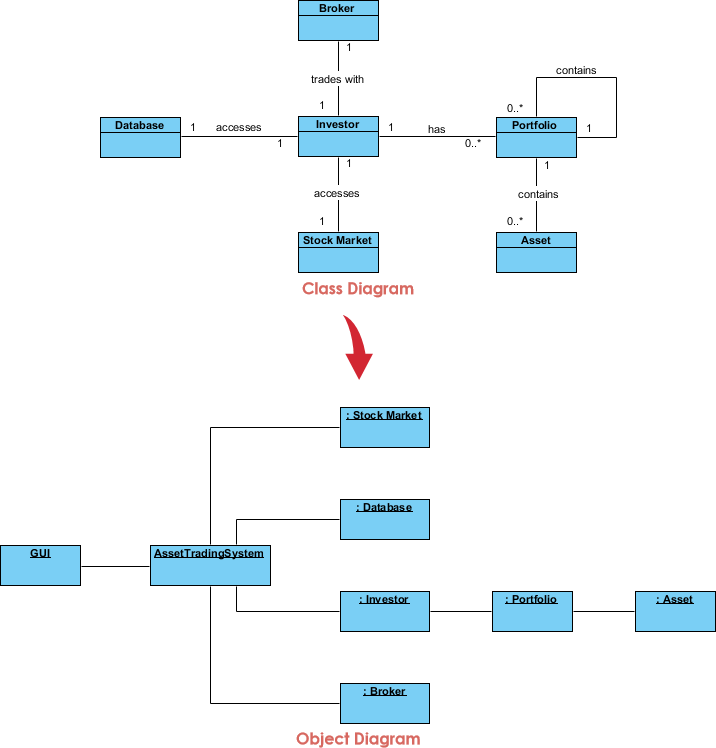
In this comprehensive guide, we will explore the nuances between these two diagram types, determine when to use each, and demonstrate how they contribute to the overall understanding of a software system’s structure and behavior.
Key Concepts
Before diving into the comparison, it is crucial to define the foundational terms used in these diagrams.
- UML (Unified Modeling Language): The standard visual modeling language used to describe, specify, design, and document the artifacts of a software system.
- Class: A blueprint or template for creating objects. It defines the initial properties (attributes) and behaviors (methods) that the objects will have. It represents an abstract concept.
- Object: A distinct instance of a class. It represents a specific entity in memory at a specific moment in time, containing actual data values for the attributes defined by the class.
- Static View: Represents the structure of the system that does not change over time (e.g., code structure).
- Dynamic View: Represents the behavior of the system as it runs, capturing how objects interact and change states.
Class vs. Object Diagram: The Deep Dive
To master UML, one must understand the specific roles these two diagrams play.
 1. The Class Diagram
Purpose: Class diagrams are the backbone of UML modeling. They are primarily used for modeling the static structure of a software system. They depict the system’s blueprints independent of time.
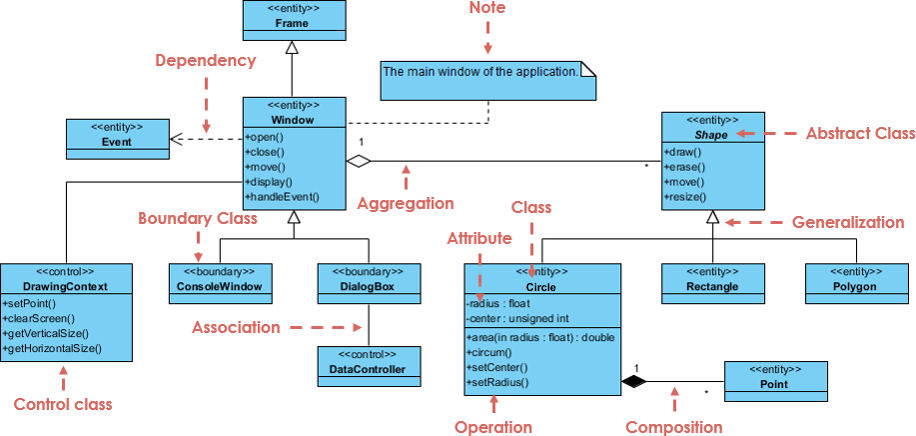
Key Elements:
- Classes: The building blocks (e.g.,
Customer, Order).
- Attributes & Methods: The data and functions within a class.
- Relationships: Associations, generalizations (inheritance), dependencies, and multiplicities (e.g., one-to-many).
Use Cases:
- System Design: Defining the high-level architecture.
- Code Generation: acting as the source for automated code creation.
- Documentation: Serving as a reference for the static codebase.
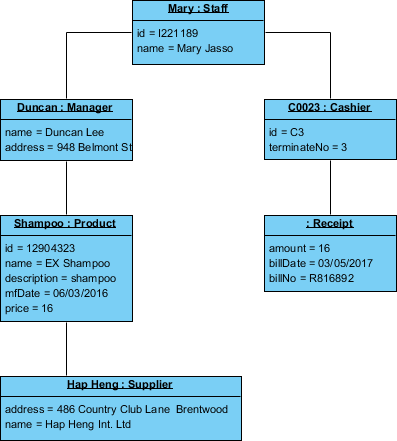
Purpose: Object diagrams focus on capturing a snapshot of the runtime instances of classes and the relationships between them at a specific moment in time. They are concrete and specific.
Key Elements:
- Objects: Specific instances (e.g.,
John:Customer, Order#123:Order).
- Links: Associations between specific objects.
- Attribute Values: The actual data held by the object at that moment (e.g.,
status = 'shipped').
Use Cases:
- Testing & Debugging: visualizing complex data structures during a crash or bug.
- Scenario Illustration: showing how specific objects relate during a specific use case.
- Data Visualization: Understanding memory snapshots.
Examples: From Blueprint to Instance
To visualize the difference, let us look at a standard software scenario involving a Car and an Engine.
Scenario A: The Class Diagram (The Blueprint)
In the design phase, you define the rules. You state that a Car generally has an Engine.
- Class Name:
Car
- Attributes:
color: String, model: String
- Methods:
drive(), brake()
- Relationship: A
Car has a 1-to-1 association with an Engine.
This diagram does not exist in reality; it is just a definition.
Scenario B: The Object Diagram (The Reality)
The application is running. You have instantiated a specific car. The Object Diagram represents this specific memory state.
- Object Name:
myTesla: Car
- State/Values:
color = "Red"model = "Model S"
- Linked Object:
engine_v9: Engine
This diagram represents a concrete fact about the system at a specific timestamp.
When to Use Which?
Knowing when to switch between these diagrams is a hallmark of a senior architect.
Use Class Diagrams When:
- Architecture Planning: You are designing the skeleton of the application before writing code.
- Data Modeling: You need to design a database schema or class hierarchy.
- API Definition: You are defining interfaces and how different modules depend on each other.
Use Object Diagrams When:
- Debugging: You are trying to understand why a specific logical error occurs by mapping out the object state.
- Complex Relationships: The abstract class diagram is too complex, and you need a concrete example to explain a circular reference to a stakeholder.
- Test Case Definition: You want to document the expected state of the system before and after a test execution.
Detailed Comparison Table
| Aspect |
Class Diagrams |
Object Diagrams |
| Purpose |
Represent the static structure (classes, methods, relationships). |
Depict a snapshot of specific instances at a specific time. |
| Focus |
High-level system design and architecture. |
Runtime scenarios, testing, and debugging. |
| Elements |
Classes, interfaces, inheritance, multiplicities. |
Objects (instances), links, current values. |
| Time Perspective |
Static (Time-independent). |
Snapshot (Time-dependent). |
| Instance Details |
Shows attributes definitions (types). |
Shows attribute values (data). |
| Lifecycle Phase |
Design and Development. |
Testing and Debugging. |
VP AI: How Visual Paradigm AI Enhances Modeling
Creating UML diagrams manually can be time-consuming, but Visual Paradigm AI transforms this process by leveraging artificial intelligence to automate and enhance diagram generation.
- Text-to-Diagram: Instead of dragging and dropping shapes, you can describe your system in natural language. For example, typing “A Library system with Books, Members, and Loans” into VP AI can automatically generate a comprehensive Class Diagram with appropriate attributes and relationships.
- Scenario Visualization: VP AI can help bridge the gap between static and dynamic views. By providing a use-case scenario, the AI can suggest Object Diagrams that depict how the system’s objects should look at specific execution points, saving hours of manual object instantiation mapping.
- Code Engineering: Visual Paradigm acts as a bridge between design and code. You can reverse engineer existing code to generate Class Diagrams instantly, or use the AI to generate boilerplate code from your diagrams, ensuring your architecture and implementation stay in sync.
Summary
Class diagrams serve as the foundational tool for representing the static structure of a software system, acting as the blueprint for development. On the other hand, object diagrams provide the necessary reality check, offering a concrete view of how those blueprints behave as instances in runtime. By leveraging both—and utilizing a modern UML tool like Visual Paradigm AI—developers and architects can ensure their systems are not only well-designed but also robustly understood and tested.
 Visual Paradigm Desktop |
  Visual Paradigm Online


