 Visual Paradigm Desktop |
  Visual Paradigm Online


Imagine you’re a software architect tasked with designing a hotel room booking system. You start with a simple, high-level sequence diagram describing the user’s journey: search, check availability, and pay. But how do you turn that basic flow into a detailed, architecturally sound model that developers can use? Enter the AI-Powered Sequence Diagram Refinement Tool from Visual Paradigm. This online tool doesn’t just draw diagrams; it intelligently analyzes your initial text-based code and transforms it into a refined, professional-grade sequence diagram. It’s like having an architectural expert on your team, instantly dissecting your system’s logic and reassembling it into a more detailed, structured view. The process is so smooth, you might wonder if it’s magic. But it’s just smart AI, working behind the scenes to accelerate your design. Let’s walk through the entire 4-step journey, using a “Hotel Room Booking System” as our example, to see how this tool turns a simple idea into a clear, actionable blueprint.
Quick summary:
Use the AI-Powered Sequence Diagram Refinement Tool to turn high-level diagrams into detailed, architecturally sound ones.
Start with a text-based diagram in PlantUML or Mermaid syntax.
Let AI decompose your diagram into architectural layers (e.g., UI, Business Logic).
Generate a refined, detailed sequence diagram, often in an MVC pattern.
Export the result as an SVG or import it directly into Visual Paradigm Online.
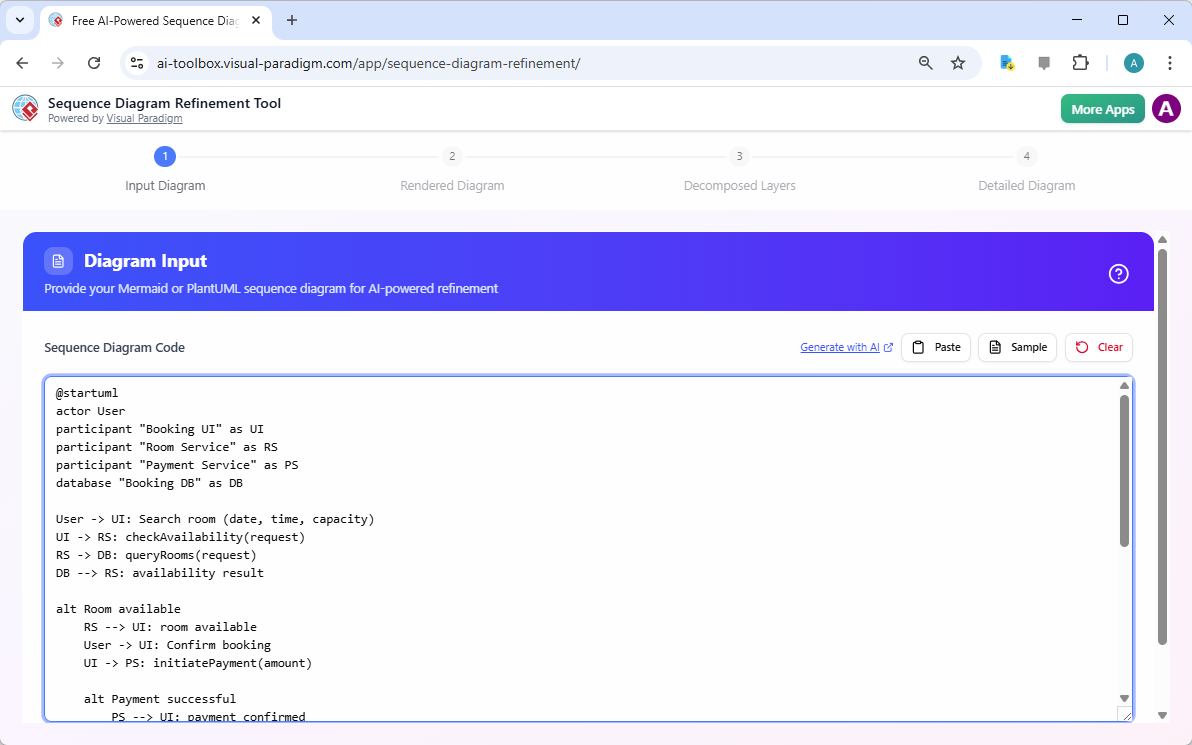
The journey begins with a simple text box. This is where you provide the foundation for your entire design. You can use either PlantUML or Mermaid syntax, two popular text-based languages for creating diagrams. The tool is designed for those who prefer the precision of code over the drag-and-drop of a visual editor. For our hotel booking example, you’d input a sequence that outlines the core interactions: the user searches for a room, the system checks availability, and the user makes a payment. The syntax is clean and readable, allowing you to define actors, participants, and the flow of messages between them. It’s crucial to ensure your code is syntactically correct, as errors will prevent the tool from rendering your diagram correctly in the next step. This initial input is the seed from which your detailed design will grow.
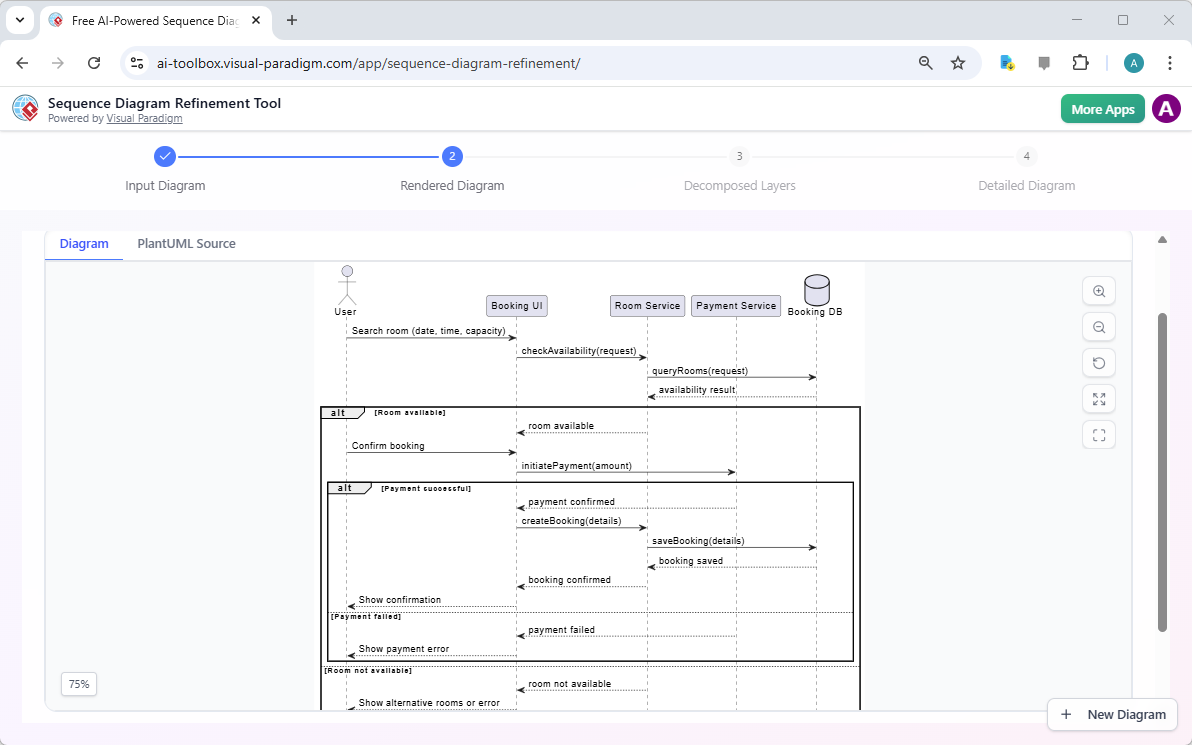
After you input your code, the tool immediately renders it into a visual sequence diagram. This is the first time you see your abstract code come to life as a clear, visual representation. The diagram shows the actors (like the User) and the system components (like the Booking UI, Room Service, and Payment Service), connected by arrows that represent the messages being exchanged. The tool supports control structures like alt (for alternative paths, like success vs. failure) and loop (for repeated actions), which are essential for modeling complex logic. You can zoom in and out, and the visual feedback is immediate, allowing you to verify that your code accurately reflects your intended flow. This live preview is invaluable for catching syntax errors or logical flaws before you proceed.
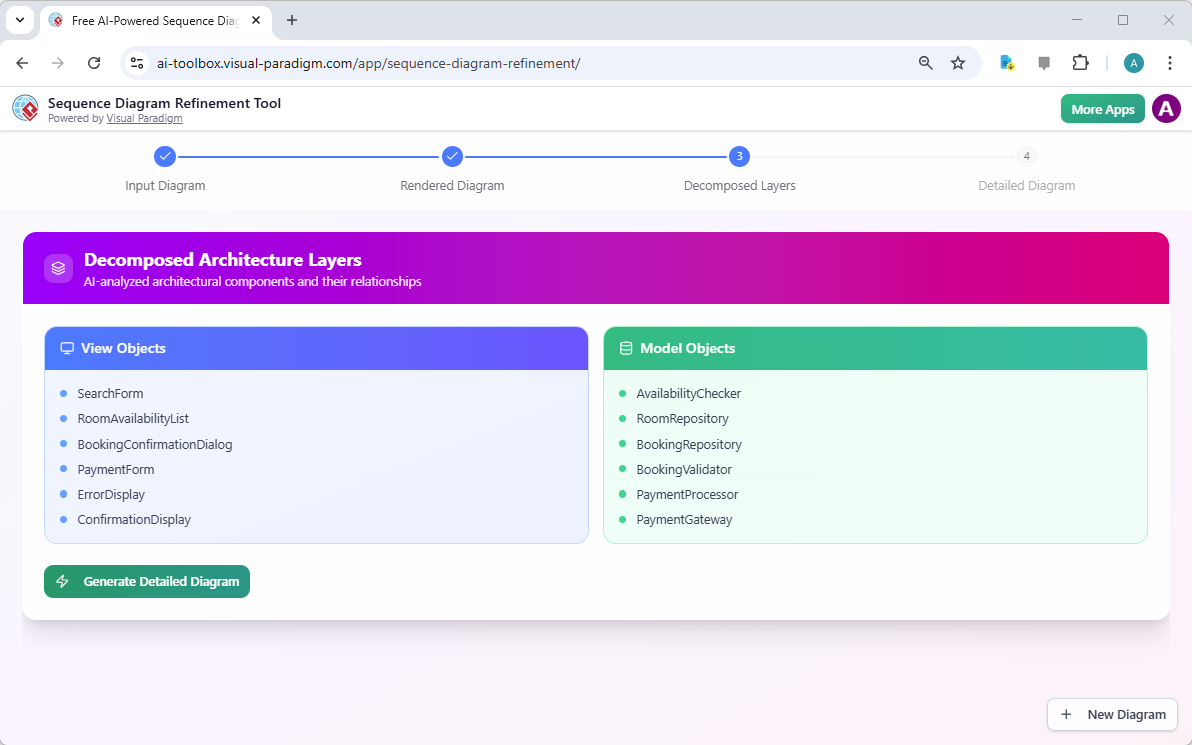
Now, the magic begins. After you click the “Decompose Layers” button, the AI takes over. It doesn’t just draw a picture; it analyzes the underlying structure of your sequence. It breaks down the interactions into logical architectural layers, such as the presentation layer (the UI components like SearchForm and BookingConfirmationDialog) and the business logic layer (the core components like AvailabilityChecker and RoomRepository). This step is crucial because it reveals the hidden architecture implied by your high-level flow. You can see how your “Room Service” participant is actually composed of multiple model objects, each with a specific responsibility. This AI-powered decomposition provides a structural understanding that you might not have considered, helping you to design a more robust and maintainable system. It’s like the AI is reverse-engineering the architecture from your use case.
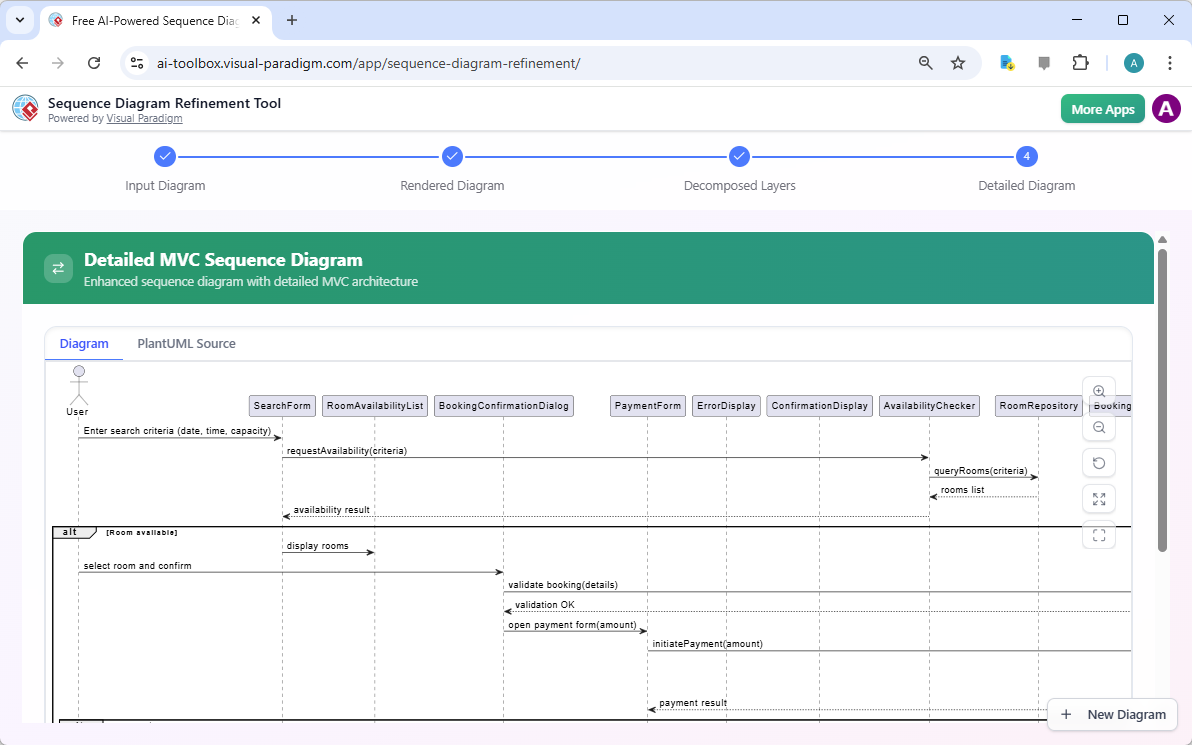
With the architectural layers identified, the AI then generates a new, more detailed sequence diagram. This refined diagram takes the high-level interactions and maps them onto the specific components you saw in the decomposition. It transforms the generic “Room Service” into a sequence of calls between a SearchForm, a RoomAvailabilityList, and a BookingConfirmationDialog, all orchestrated by a AvailabilityChecker. The result is a detailed MVC (Model-View-Controller) sequence diagram that clearly illustrates how the user interface, business logic, and data access components interact. This level of detail is essential for developers to understand the system’s flow and for ensuring that the design is consistent and complete. The final diagram is not just a visual aid; it’s a precise, executable blueprint.
The AI-Powered Sequence Diagram Refinement Tool is more than just a diagram generator; it’s a powerful design accelerator. It bridges the gap between a conceptual idea and a detailed, implementable architecture. For software architects and system designers, it saves countless hours of manual work, ensuring that the transition from a high-level flow to a detailed design is both fast and accurate. The structured 4-step workflow guides you through the process, making it easy to use, even if you’re not an expert in UML. The ability to export the final diagram as an SVG ensures you have a high-quality image for documentation or presentations. Furthermore, the direct integration with Visual Paradigm Online allows you to seamlessly import your refined diagram for further modeling, collaboration, and documentation. This tool is a must-have for anyone who designs software systems, helping you to create clearer, more consistent, and more professional diagrams with minimal effort.
Ready to transform your sequence diagrams from simple sketches into detailed architectural blueprints? Try the AI-Powered Sequence Diagram Refinement Tool today and experience the power of AI in your design process. Try Now.
AI-Powered Sequence Diagram Refinement in Visual Paradigm: Discover how Visual Paradigm’s AI tool transforms use-case descriptions into precise and professional sequence diagrams with minimal manual effort.
Mastering Sequence Diagrams with Visual Paradigm: AI Chatbot Tutorial: A beginner-friendly tutorial using Visual Paradigm to create sequence diagrams, illustrated through a real-world e-commerce chatbot use case.
Visual Paradigm – AI-Powered UML Sequence Diagrams: Learn how to generate UML sequence diagrams instantly using AI within Visual Paradigm’s advanced modeling suite.
AI-Powered Sequence Diagram Refinement Tool | Visual Paradigm: Discover how Visual Paradigm’s AI Sequence Diagram Refinement Tool enhances UML modeling by automatically improving and optimizing sequence diagrams with intelligent suggestions.
Simplify Complex Workflows with Visual Paradigm AI Sequence Diagram Tool: Explore how Visual Paradigm’s AI-enhanced sequence diagram tool simplifies the modeling of complex system interactions and workflows.
AI Sequence Diagram Refinement Tool | Visual Paradigm: Use AI to automatically refine and optimize your sequence diagrams for better readability, correctness, and consistency.
Beginner’s Tutorial: Create Your First Professional Sequence Diagram in Minutes: A beginner-friendly guide to generating professional sequence diagrams quickly using Visual Paradigm’s AI chatbot feature.
From Simple to Sophisticated: AI-Powered Sequence Diagram Refinement Tool: Explore how Visual Paradigm’s AI-powered tool evolves simple diagrams into sophisticated, accurate models with minimal effort.