 Visual Paradigm Desktop |
  Visual Paradigm Online


Project initiation is often characterized by a disconnect between high-level business strategy and detailed technical implementation. Stakeholders frequently struggle to move from ambiguous conversations to concrete execution plans. Visual Paradigm AI serves as a transformative force during this critical phase, bridging the gap between abstract goals and standardized visual blueprints. By integrating strategic analysis tools directly with Unified Modeling Language (UML) modeling, the platform ensures that project teams can transition from vision to execution in seconds.
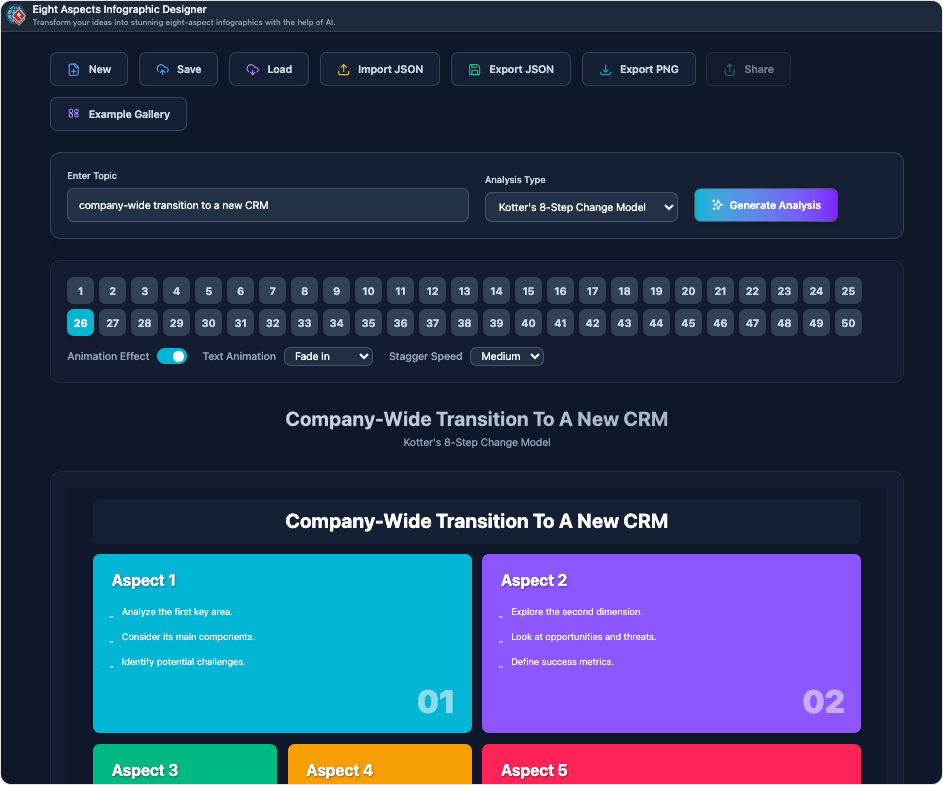
Before committing to technical design, project managers and analysts must define the problem space accurately. Visual Paradigm AI provides a suite of AI-powered builders for strategic frameworks, allowing teams to establish a solid foundation based on data and structured analysis.
The platform facilitates deep analysis through established frameworks:
A distinct advantage of this workflow is the capability for Strategic to Technical Mapping. Each strategic tool functions as a diagnostic component that informs the technical architecture. For instance, the insights derived from a SWOT analysis can be directly converted into a UML Use Case diagram. This ensures that functional requirements are not arbitrary but are specifically designed to address identified market threats or capitalize on strategic opportunities.
The Visual Paradigm AI chatbot acts as a cognitive assistant, translating natural language descriptions into formal modeling languages. This capability eliminates the “maze without a map” sensation often experienced at the start of complex projects.
The AI bridges the gap between vision and specification through several key mechanisms:
Unlike siloed applications where strategic planning occurs separately from technical diagramming, Visual Paradigm offers a unified “bridge.” This integration ensures that the architectural vision is preserved throughout the development lifecycle.
A common pitfall of using general Large Language Models (LLMs) for diagramming is the production of “pretty sketches” that violate technical rules. Visual Paradigm AI distinguishes itself by being uniquely trained on established standards. It strictly adheres to UML 2.5 and ArchiMate 3 specifications, ensuring that generated blueprints are technically valid and ready for professional use.
For architects and project managers, the platform’s Business Layer creates a direct alignment between high-level business goals and technical capabilities using ArchiMate 3 standards. This ensures that every technical decision can be traced back to a business requirement.
Project initiation is rarely a “one-shot” success. The platform supports conversational refinement, known as Diagram Touch-Up. This allows teams to iteratively “drill down” into the logic—for example, adding a two-factor authentication layer to a security flow—without destroying the integrity of the original layout.
Visual Paradigm AI transforms project initiation from a manual, expert-dependent chore into a collaborative, scalable workflow. It empowers teams to focus on strategic design decisions rather than the mechanics of drawing.
To understand the value of this specialized AI, consider this analogy: If a general AI is like a talented sketch artist who can draw anything you describe but might forget essential structural elements like load-bearing walls, Visual Paradigm AI is like an architect equipped with a CAD system. It understands the building codes (modeling standards) and ensures the strategic blueprint is not only visually accurate but technically sound and ready for construction.
This is a top match as it directly addresses AI-driven tools specifically designed for creating infographics, charts, and graphics, aligning perfectly with the query.
A strong match, highlighting a dedicated AI-powered infographic tool with intelligent design features that enhance workflow and creativity.
This is a highly relevant match, showcasing an advanced AI-powered infographic designer with eight intelligent design dimensions, ideal for high-quality visual content creation.
A relevant match for users seeking accessible, no-design-experience-needed tools to create professional infographics using AI-enhanced features.
This is a strong match as it provides ready-made, professionally designed templates that can be quickly customized—ideal for fast, effective infographic creation with AI support.
A valuable resource for users looking to learn how to create infographics using AI-enhanced tools, offering clear, actionable guidance.
Another excellent match, providing a guided, user-friendly tutorial for creating infographics online with AI-assisted tools and intuitive design features.
 The Ultimate Guide to PESTLE Analysis: Mastering Strategic Planning with AI
A Comprehensive Guide to Visual Paradigm AI: Architecture, Features, and Strategic Value
Overcoming Inconsistency: A Comprehensive Guide to Coherent AI-Generated UML
Comprehensive Guide to UML Class Diagrams: From Basics to AI-Powered Design
The Ultimate Guide to PESTLE Analysis: Mastering Strategic Planning with AI
A Comprehensive Guide to Visual Paradigm AI: Architecture, Features, and Strategic Value
Overcoming Inconsistency: A Comprehensive Guide to Coherent AI-Generated UML
Comprehensive Guide to UML Class Diagrams: From Basics to AI-Powered Design