 Visual Paradigm Desktop |
  Visual Paradigm Online
Before a single line of code is written, a successful software product must answer the most critical question: “What tasks must the user be able to perform?” The UML Use Case Model is the definitive framework for addressing this. It supplies a functional, actor-based map of the system’s intended capabilities and boundaries. Serving as the primary specification tool, it acts as the necessary translation layer between business needs and development tasks. A dedicated AI modeling co-pilot radically overhauls this traditional process, enabling specification to be instantaneous, error-proof, and fully collaborative.
This guide details the Use Case Model structure and demonstrates how an AI assistant will accelerate your product specification workflow.
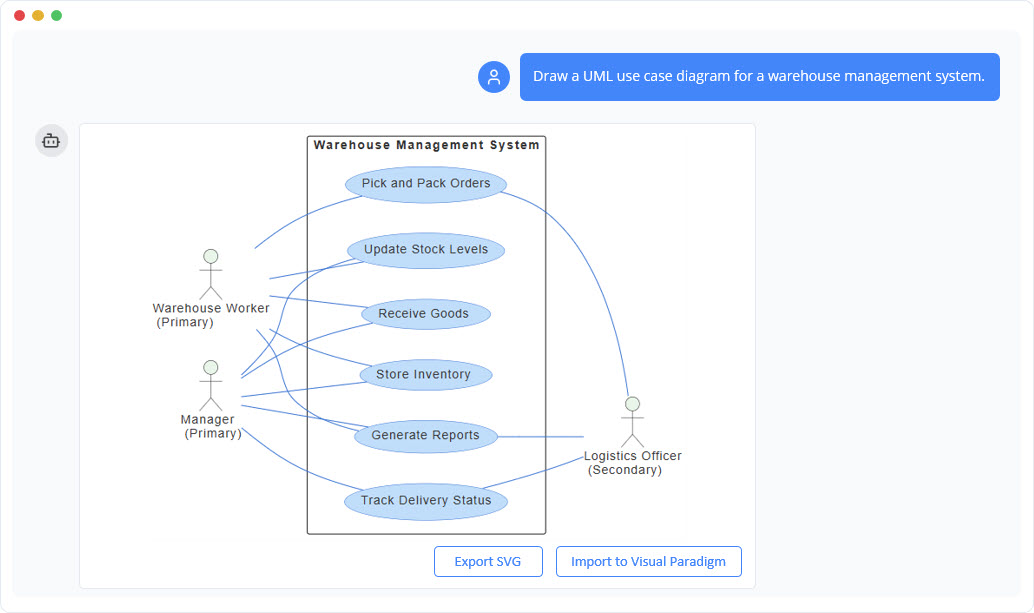
A Use Case Model visually represents a system’s functionality by mapping all relationships between external agents (Actors) and the functional tasks they are enabled to execute (Use Cases). It presents a high-fidelity external blueprint of the system, defining what the system is designed to achieve rather than the implementation details.
The specification process relies heavily on team communication and refinement. Integrating an AI co-pilot fundamentally streamlines the effort.
Instant Visualization of Requirements: Instead of manual drawing, you feed the AI your acceptance criteria. It instantly translates complex textual requirements into a clean, structured visual model with correct entity mapping.
Real-Time Collaborative Specification: In agile stand-ups or product definition meetings, you can live-type stakeholder feedback into the tool. The model updates on the screen in real-time, creating instant visual consensus and closing alignment gaps.
Automated Relationship Logic: The technical distinction between <<include>> and <<extends>> is abstracted. Describe the logic in a simple sentence (“A user always checks their balance before transfer”), and the AI automatically renders the correct UML link, ensuring model accuracy.
Gaps and Consistency Analysis: The AI dynamically scans the model for any missing logical connections, such as unlinked actors or orphaned tasks. This feature helps you validate that the final specification is comprehensive and fully traceable.
The AI-generated model is a valuable asset throughout the development lifecycle, moving beyond simple documentation.
Defining Project Scoping: The finished model is used to quickly agree upon the Minimum Viable Product (MVP) boundary and clearly communicate the project’s value proposition to funding stakeholders.
Eliciting Detailed Specification: In focused sessions with subject matter experts, the live-built model is used to rapidly capture and validate functional processes and non-functional constraints.
Providing Agile Context: The model provides a high-level functional map for the engineering team, giving strategic “why” context to the tactical user stories being planned for the next sprint.
Driving the Testing Strategy: Each Use Case becomes the foundation for a functional acceptance test. Actors define the user test profiles, and ≪extend$\gg$ links highlight mandatory conditional test scenarios.
Effective prompts ensure an accurate model. The AI tool is designed to interpret natural language:
Basic Elements: “Create a system model for a library app with an actor ‘Librarian’ and a task ‘Issue Book’.”
Adding Relationships: “Show that ‘Renew Book’ `<<includes>>` ‘Authenticate User’.”
Optional Behavior: “The task ‘Calculate Late Fee’ `<<extends>>` ‘Return Book’.”
Model Analysis: “List all the tasks that the ‘Administrator’ actor can perform.”
The UML Use Case Diagram is the essential starting point for any successful software project. By leveraging an AI assistant, we strip away the friction of manual diagramming and transform the requirements process into an interactive, collaborative, and intelligent dialogue. This synergy ensures that we are not just building the system right, but that we are building the right system.
