 Visual Paradigm Desktop |
  Visual Paradigm Online


In a world that’s constantly changing, one thing remains true: curiosity drives progress. Whether we’re exploring new ideas, uncovering hidden truths, or simply trying to understand the world around us, the journey begins with a single step—often, a thoughtful introduction.
This is more than just an opening; it’s a gateway. A moment to pause, reflect, and set the stage for what’s to come. So let’s begin—not with answers, but with questions. Not with certainty, but with possibility.
Because every great story, every powerful idea, starts with an intro.
✅ Perfect for Enterprise Architects, Solution Architects, and DevOps Teams
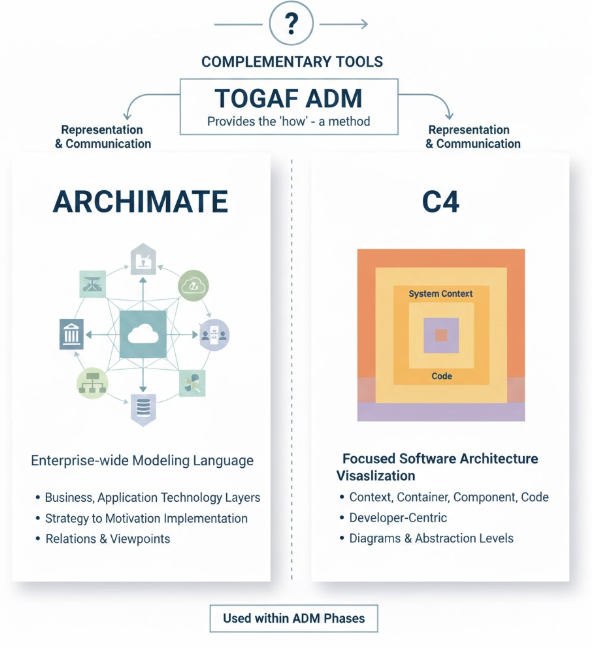
🛠️ Tools Used: Visual Paradigm (Free Trial Available), TOGAF ADM, ArchiMate 3.2, C4 Model
📌 Goal: Build a full enterprise architecture for an e-commerce system—from business vision to code-ready diagrams—with AI-powered automation and traceability.
Visual Paradigm (Download from www.visual-paradigm.com)
Free Trial available (no credit card required)
Internet connection
Optional: GitHub account (for code integration)
Click “Download” → Choose Visual Paradigm Community Edition (free).
Install and launch the application.
On startup, select “Create New Project” → Choose “Enterprise Architecture” template.
Name your project: “RetailX E-Commerce Migration”
✅ You now have a fully configured TOGAF ADM workspace with ArchiMate and C4 support.
In the Project Explorer, right-click “Architecture Vision” → Select “Create New Diagram” → Choose “ArchiMate Motivation”.
Add:
Business Goal: Reduce checkout time to under 3 seconds
Business Driver: Customer experience improvement
Capability: Fast Order Processing
Click “AI Assistant” (top-right) → Type:
“Generate a high-level context diagram for an e-commerce system serving customers with payment and inventory integration.”
Visual Paradigm auto-generates:
A C4 Level 1 (Context) diagram showing:
Person: Customer
Software System: E-Commerce Platform
External Systems: Payment Gateway, Inventory System
A ArchiMate Motivation Diagram showing goal → driver → capability.
✅ Pro Tip: Use the “Sync” button to link ArchiMate elements to C4 diagrams automatically.
Go to “Business Architecture” → Create a new ArchiMate Business Process Diagram.
Add:
Business Actor: Customer
Business Process: Place Order
Business Service: Order Validation
Data Object: Order Details
Use drag-and-drop to connect:
Customer → Place Order
Place Order → Order Validation
Order Validation → Order Details (data flow)
Open AI Assistant → Type:
“Suggest improvements to the ‘Place Order’ process and identify missing components.”
AI responds:
Suggests adding “Inventory Check” and “Payment Processing” services.
Recommends splitting the process into sub-processes.
Update your diagram accordingly.
✅ Now your business process is complete, traceable, and AI-optimized.
Go to “Information Systems Architecture” → Create ArchiMate Application Landscape.
Add:
Application Component: Order Service
Application Component: Payment Service
Application Component: Inventory Service
Data Object: Order Data
Add relationships:
Realization: Order Service → Order Validation (shows how it’s supported)
Data Flow: Order Service → Payment Service
Dependency: Payment Service → Inventory Service
Use AI Assistant → Type:
“Generate a C4 Level 2 (Container) diagram based on these components.”
Visual Paradigm auto-generates:
Container Diagram showing:
API Gateway (container)
Order Microservice (container)
Payment Service (container)
Database (PostgreSQL) (container)
Interaction arrows: HTTPS, REST, gRPC
✅ Your architecture now spans enterprise modeling (ArchiMate) and technical clarity (C4).
Go to “Technology Architecture” → Create ArchiMate Technology View.
Add:
Technology Node: AWS EC2 (for Order Microservice)
Technology Node: Kubernetes Cluster (for deployment)
Technology Node: AWS S3 (for storage)
Network: Internal Network
Connect with:
Deployment: EC2 → Kubernetes
Data Flow: S3 → EC2
Use AI Assistant → Type:
“Suggest cloud deployment patterns for microservices and security best practices.”
AI recommends:
Auto-scaling groups
IAM roles
Load balancer
VPC segmentation
Use the “Generate Deployment Diagram” button → Creates C4 Level 2 Deployment Diagram.
✅ Now you have a cloud-ready architecture with real infrastructure mapping.
Go to “Opportunities and Solutions” → Create ArchiMate Gap Analysis View.
Use AI Assistant → Type:
“Compare current monolith architecture with target microservices architecture. Identify gaps and suggest migration paths.”
Visual Paradigm generates:
Side-by-side comparison of current vs. target
Gap Analysis Table:
| Component | Current | Target | Gap |
|---|---|---|---|
| Order Service | Monolith | Microservice | ✅ New |
| Inventory Check | In-app | Separate service | ❌ Missing |
| Payment Gateway | Direct | API-based | ⚠️ Needs refactoring |
AI suggests:
“Decompose monolith into 3 services: Order, Payment, Inventory.”
“Start with Order Service migration.”
✅ You now have a clear, AI-backed migration strategy.
Go to “Migration Planning” → Create Migration Plan.
Use AI Assistant → Type:
“Create a 6-month migration plan with phases, risks, and dependencies.”
AI generates:
Gantt Chart with:
Month 1–2: Refactor Order Service
Month 3–4: Deploy Payment Service
Month 5–6: Integrate Inventory Service
Risk Matrix:
High Risk: Data migration
Medium Risk: API compatibility
Dependency Graph: Shows which services must be ready first.
✅ Share the plan with stakeholders via PDF export or HTML report.
Go to “Implementation Governance” → Create Governance View.
Use AI Assistant → Type:
“Set up compliance rules: All services must use API Gateway and not access DB directly.”
Visual Paradigm creates:
Architecture Rule: “No direct DB access from API”
CI/CD Integration: Connect to GitHub (via plugin)
When a developer pushes code:
Visual Paradigm scans the code
Flags violations (e.g., db.query() in API)
Blocks PRs if rule is broken
✅ Architecture becomes enforced, not ignored.
Go to “Architecture Change Management” → Use “Change Impact Analysis”.
Make a change: Rename “Order Service” → “Order Management Service”
Click “Analyze Impact” → AI identifies:
Affected diagrams: C4 Level 2, ArchiMate Application Landscape
Impacted services: Payment Service, Inventory Service
Code files: OrderController.java, order-service.yml
Use “Auto-Update” to regenerate all affected diagrams.
✅ Changes are traceable, safe, and consistent.
You now have:
| Artifact | Format | Source |
|---|---|---|
| Business Goal & Context | ArchiMate + C4 Level 1 | Phase A |
| Business Process | ArchiMate | Phase B |
| Application & Data Model | ArchiMate | Phase C |
| Deployment & Infrastructure | C4 Level 2 + ArchiMate | Phase D |
| Migration Plan | Gantt + Risk Matrix | Phase F |
| Governance Rules | Code-linked | Phase G |
| Change Impact Report | AI-analyzed | Phase H |
🎉 All in one platform. All connected. All traceable.
Click “Export” → Choose:
PDF (for executives)
HTML (for internal wiki)
Markdown (for Confluence)
Use “AI Summary” → Generate a 1-page executive summary:
“RetailX is migrating to microservices to reduce checkout time. 3 key services are being refactored. AI-driven governance ensures compliance. Full traceability from business goal to code.”
| Feature | Benefit |
|---|---|
| One Platform | No more switching between tools. |
| AI-Powered | Auto-generates diagrams, detects gaps, suggests improvements. |
| Traceability | Links business goals → code. |
| C4 + ArchiMate Sync | Seamless integration across modeling languages. |
| DevOps Integration | Enforces architecture in CI/CD pipelines. |
👉 Download Visual Paradigm Free Trial: https://www.visual-paradigm.com
👉 Try the TOGAF ADM Template: Search “TOGAF” in the template library
👉 Join 100,000+ Architects who are building smarter, faster, and with AI.
“Great architecture isn’t built in isolation. It’s built with clarity, collaboration, and confidence.”
— Your journey starts here with Visual Paradigm.
🚀 Start your free trial today and turn enterprise architecture into a strategic, executable force.|