 Visual Paradigm Desktop |
  Visual Paradigm Online
In the fast-paced world of digital product development, traditional business plans often become obsolete before they are even finalized. Whether you are a startup founder, a product manager, or part of an agile team, the need for a dynamic, iterative approach to strategy is paramount. Enter the Lean UX Canvas, a framework developed by Jeff Gothelf that bridges the gap between high-level business goals and user-centric design.
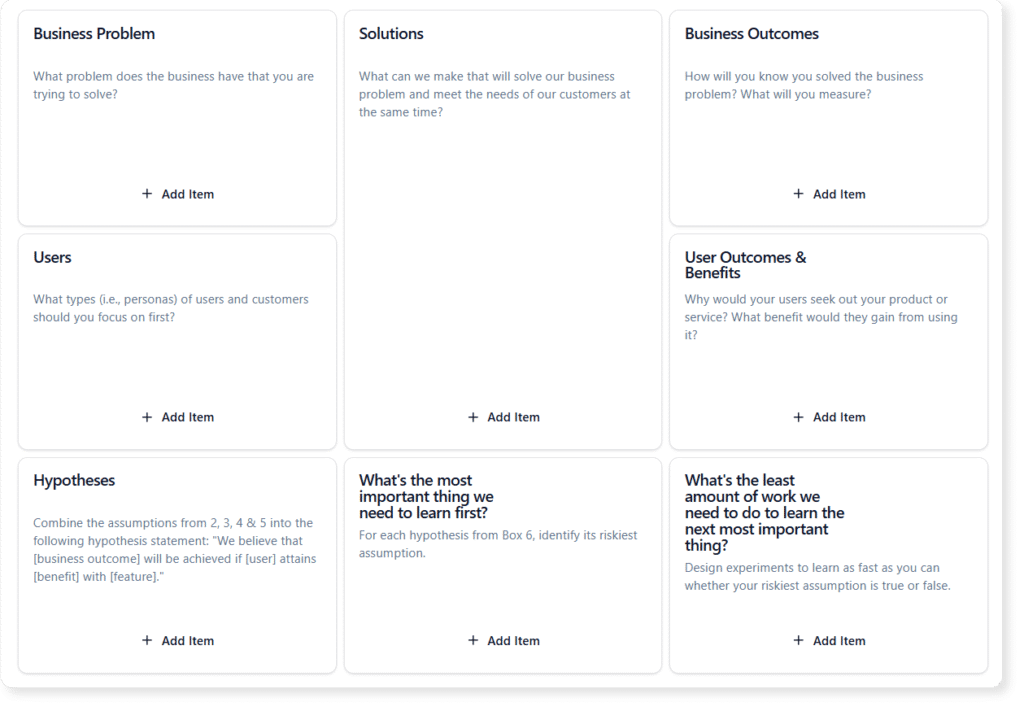
This guide explores the Lean UX Canvas in depth, detailing how it helps teams frame their work as business problems to solve rather than features to build. We will also explore how modern tools, specifically Visual Paradigm AI, can revolutionize how you populate, analyze, and implement these strategies.
Before diving into the mechanics of the canvas, it is essential to understand the foundational definitions that drive this framework.
Visual Paradigm has integrated advanced Artificial Intelligence into its canvas tools to transform how teams strategize. While the Lean UX Canvas provides the structure, Visual Paradigm AI provides the intelligence to fill it effectively and accurately.
Starting from a blank page is often the hardest part of strategy. With Visual Paradigm, you can generate an entire canvas from a single idea. By simply describing your vision, the AI canvas generator creates a structured, insight-rich draft. This helps you visualize the initial scope and refine your next big idea without spending hours on formatting or initial brainstorming.
Creative blocks can stall progress. The VP AI Ideation Engine offers context-sensitive prompts for every section of the canvas. Whether you are struggling to define a User Benefit or a specific Solution, the AI suggests ideas to expand your thinking, helping to remove barriers and explore new strategic directions.
Once your canvas is populated, VP AI does not stop there. It can run automatic analyses such as SWOT, Market Potential, and Risk Evaluation based on the data in your Lean UX Canvas. This turns static concepts into actionable strategic insights, allowing you to test assumptions and enhance decision-making accuracy before writing a single line of code.
Creating a Lean UX Canvas is a collaborative process. Follow these step-by-step guidelines to ensure your canvas effectively bridges the gap between business needs and user value.
Start by identifying the current state of the business. What problem are you trying to solve? Ensure this is stated clearly and is not a disguised feature request. Ask: “What goal are we failing to reach?”
Determine the changes in customer behavior that will indicate you have solved the problem. These should be quantitative and qualitative metrics (e.g., increasing retention by 10% or reducing support tickets).
Who are you solving this problem for? Be specific. Instead of “everyone,” focus on specific personas like “Busy Marketing Managers” or “First-time Home Buyers.” This focuses your strategy.
What specific goals are your users trying to achieve? This is not about your product, but about their lives. For example, a user benefit is not “saving a file,” but rather “having peace of mind that work is secure.”
List product features, improvements, or services that you believe will deliver the user benefits and achieve the business outcomes. This is the place for creative ideation.
This is the core of the canvas. Combine the previous steps into testable statements: “We believe that [Solution] will result in [User Benefit] for [User Persona]. We will know we are right when we see [Business Outcome].”
Identify the riskiest assumption in your hypothesis. What is the one thing that, if false, would cause the entire strategy to fail? Focus your initial testing efforts there.
To understand the versatility of the Lean UX Canvas, consider how it applies to different business scenarios:
Maximize the effectiveness of your Lean UX sessions with these practical tips:
What Is the Business Model Canvas? Why Use Visual Paradigms & AI Tools: This comprehensive guide explains the Business Model Canvas, its core components, and how visual paradigms and AI-powered tools enhance strategic planning and business innovation.
AI-Powered Business Model Canvas Builder – Instant Strategy Design: An AI-driven tool that automates the creation of business model canvases, offering intelligent suggestions and real-time insights to accelerate business planning.
AI Canvas Tool – Intelligent Design for Business Frameworks: An AI-powered canvas application that helps users generate and refine business models, value propositions, and strategy frameworks with smart suggestions and automation.
AI Business Model Canvas Tool – Smart Strategy Development: A comprehensive AI-enhanced solution for building and refining business models with intelligent insights, real-time feedback, and collaborative features.
AI Canvas Editor Release Update: Introduces an AI-powered canvas editor that enhances diagram creation through intelligent suggestions and automated layout optimization.
AI-Powered Business Model Canvas Tool Guide: A step-by-step guide on using an AI-enhanced tool to generate and refine business model canvases with intelligent input and real-time recommendations.
Mission Model Canvas | AI-Powered Strategy Tool by VP: October 28, 2025 – Coordinate live sessions with your team using the built-in timer and export your final canvas or reports into professional formats such as Word, Markdown, or CSV. … The Mission Model Canvas is specifically designed for non-profits, government agencies, social enterprises, and any organization where the primary goal is mission achievement rather than profit.
Comprehensive Tutorial: AI-Powered Business Canvas Toolkit with Visual Paradigm: This page provides a detailed guide on using an AI-enhanced Business Model Canvas toolkit integrated with Visual Paradigm for automated business strategy development.
AI Canvas Tool – Visual Paradigm: An AI-driven tool within Visual Paradigm that enables users to generate and refine business canvases through intelligent automation and natural language input.
Mastering the Business Model Canvas with AI: Step-by-Step Guide Using Visual Paradigm: This blog post offers a structured walkthrough of leveraging AI capabilities in Visual Paradigm to create, customize, and optimize Business Model Canvases efficiently.
How the AI Business Model Canvas Builder Works – Visual Paradigm: This page explains the functionality of the AI-powered Business Model Canvas Builder, highlighting how machine intelligence automates canvas creation and strategic insight generation.
Deep Learning AI Canvas | Strategy Tools Analysis Canvas Template: Edit Localized Version: 深度學習 AI 畫布(TW) | 深度学习 AI 画布(CN) View this page in: EN TW CN · Visual Paradigm Online (VP Online) is an online diagram software that supports analysis canvases, various charts, UML, flowchart, rack diagram, org chart, family tree, ERD, floor plan, etc .
Product Canvas | AI-Powered Strategy Tool by VP: Build products people love. Combine strategy, design, and feedback into one visual space with our AI-powered Product Canvas to bring ideas to market faster.
Lean UX Canvas | AI-Powered Strategy Tool by VP: October 28, 2025 – Create a complete strategy framework in moments. Simply describe your vision, and the AI canvas generator transforms it into a structured, insight-rich canvas that helps you visualize, plan, and refine your next big idea.
Lean Canvas – Visual Paradigm: October 28, 2025 – Our application is designed to be your strategic partner, providing intelligent tools to enhance every step of your planning process for the Business Model Canvas. … Have a startup idea? Just enter ‘a mobile app for local home-cooked meal delivery’ and let our AI generate a complete Lean Canvas, outlining the problem, solution, and key metrics.