 Visual Paradigm Desktop |
  Visual Paradigm Online
In the rapidly evolving landscape of Enterprise Architecture (EA), efficiency and adherence to standards are paramount. The release of Visual Paradigm 2026 marks a significant milestone for architects and system modelers with the introduction of the AI ArchiMate & Viewpoints Generator. This comprehensive guide explores how this tool automates the creation of complex models, ensures compliance with official standards, and integrates natural language processing into your design workflow.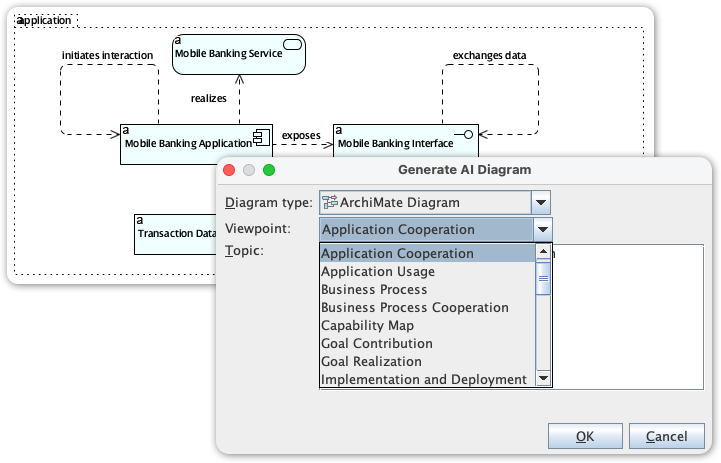
The core of the 2026 update is the ability to transform natural language prompts into structurally sound, compliant diagrams. This feature eliminates the tedious aspects of manual dragging and dropping, allowing architects to focus on strategy and analysis rather than drawing mechanics. By leveraging advanced AI, Visual Paradigm offers several key capabilities that streamline the modeling process.
The days of starting with a blank canvas are over. Users can now generate complete diagrams simply by describing a high-level requirement or a strategic topic. For example, entering a prompt like “Digital Banking Transformation” triggers the AI to construct a foundational model relevant to that specific domain. This capability significantly reduces the time required to move from conceptualization to a tangible visual draft.
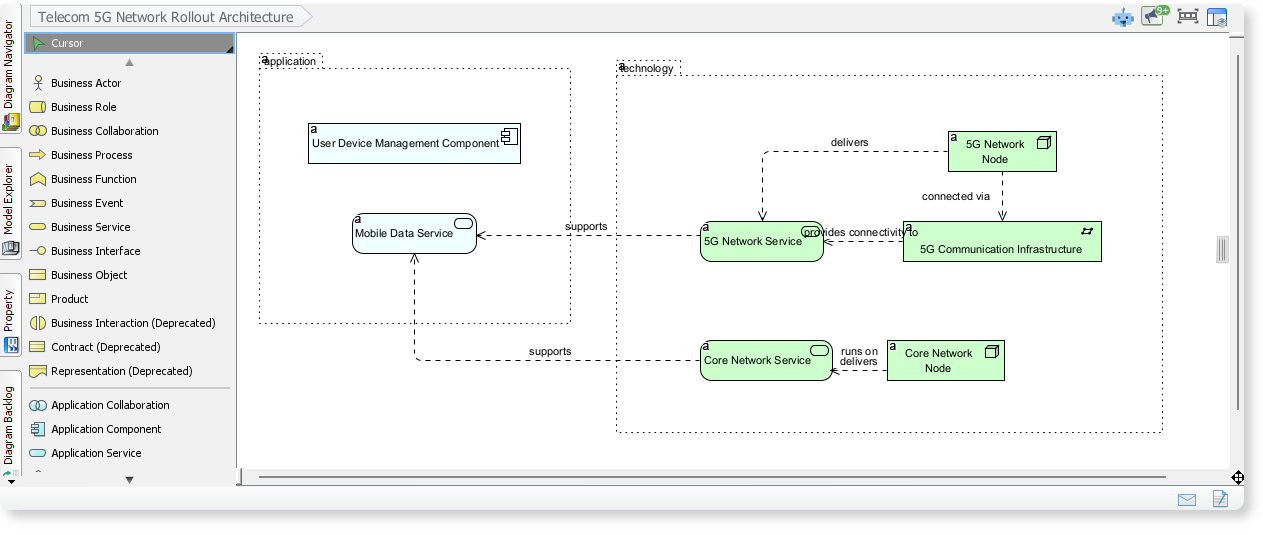
Compliance with EA standards is critical for consistency across large organizations. The AI is trained to structure outputs according to the 20+ official ArchiMate viewpoints. Whether you need a Capability Map to visualize business functions, an Application Usage diagram to track software deployment, or a Goal Realization view to align strategy with execution, the tool ensures the generated models adhere to strict ArchiMate specifications.
Beyond simple diagram generation, Visual Paradigm 2026 empowers architects with intelligent analytical tools that facilitate deeper understanding and iterative improvement of enterprise models.
One of the most powerful features is the automation of Gap Analysis. Architects can describe the “Current State” and the desired “Future State” in plain English. The AI analyzes these inputs to identify mismatches, missing components, or necessary transitions. It then suggests improvements using the standard ArchiMate Gap Analysis viewpoint, providing a clear roadmap for transformation.
The workflow remains flexible even after the initial generation. Through Conversational Editing, users can refine diagrams using chat commands such as “Add a database” or “Show which applications run on production servers.” Furthermore, the tool supports Impact Analysis, allowing users to query models to visualize consequences. For instance, asking “Show me all business processes affected if we decommission the legacy billing system” highlights dependencies, aiding in risk management and change planning.
To leverage these features within the desktop environment, follow this streamlined workflow to integrate AI into your daily modeling tasks:
Visual Paradigm offers two distinct ways to access these AI features, depending on the stage of your project and your preferred workflow.
| Feature | AI Chatbot (Online) | Desktop Integration |
|---|---|---|
| Access Point | chat.visual-paradigm.com | Visual Paradigm Desktop App |
| Primary Use Case | Early-stage brainstorming and converting meeting notes into visual workflows. | Advanced modeling, detailed architecture work, and persistent design environments. |
| Connectivity | Browser-based (No installation required). | Requires connection to Visual Paradigm Online to activate AI features. |
By understanding the strengths of both the browser-based Chatbot and the fully integrated Desktop application, Enterprise Architects can maximize their productivity. Whether initiating a new project with a quick brainstorming session online or performing detailed impact analysis on the desktop, Visual Paradigm 2026 provides the tools necessary to navigate complex architectural challenges with ease.
Comprehensive Tutorial: Generating ArchiMate Diagrams with AI: In-depth tutorial showing how to use Visual Paradigm’s AI diagram generator to create ArchiMate diagrams and viewpoints efficiently.
Introducing AI-Powered ArchiMate Viewpoints Generator in Visual Paradigm: Visual Paradigm’s latest release features an AI-driven ArchiMate viewpoints generator that automates the creation of enterprise architecture views, enhancing modeling efficiency and accuracy.
How to Use ArchiMate to Visualize Information Flows with AI: Sep 17, 2025 · Compared to generic AI tools or simple diagram generators, Visual Paradigm ’s AI -powered modeling software stands out because: It understands ArchiMate -specific concepts, including information flows, viewpoints, and business-technology alignment